 3T Consults and Coaching
PostgreSQL Admin
Keep the database behind a 24/7 imaging service healthy, backed up and explainable, without a full-time DBA.
A health dashboard, live activity, storage, backups, scheduled maintenance and plain-English recommendations for the PostgreSQL server PATK runs on. Risky actions ask first, run one at a time in the background and are audited.
The challenge
Routing, worklist, prefetch and reporting all depend on one database that never gets a quiet night. When it slows down, technologists wait at the modality and radiologists wait for priors, and the first question is always "is it the database?" Most imaging teams have nobody who can answer that quickly.
Backups are often a scheduled task that nobody checks until the day it is needed, and a disk that fills at 3 a.m. takes every feed down with it. Bringing in a DBA for routine checks is slow and costly.
What it does
A health score at a glance
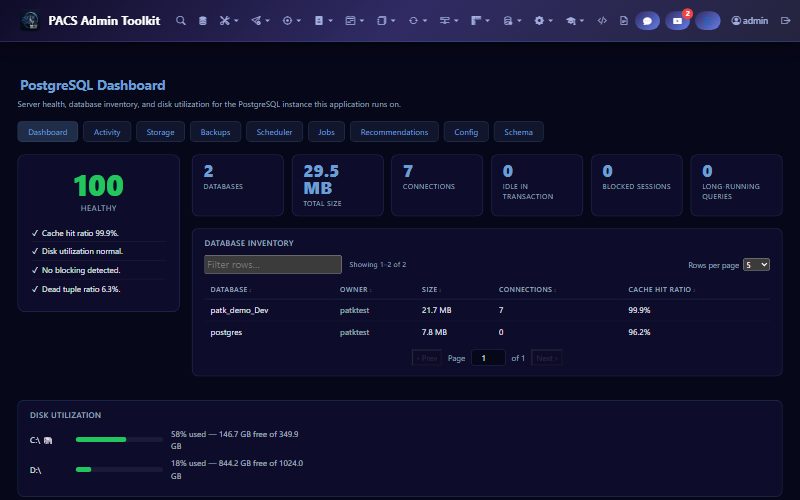
The dashboard scores the server on cache hit ratio, disk fullness, blocked sessions, idle-in-transaction sessions and dead rows, with a 30-day growth chart.
Live activity
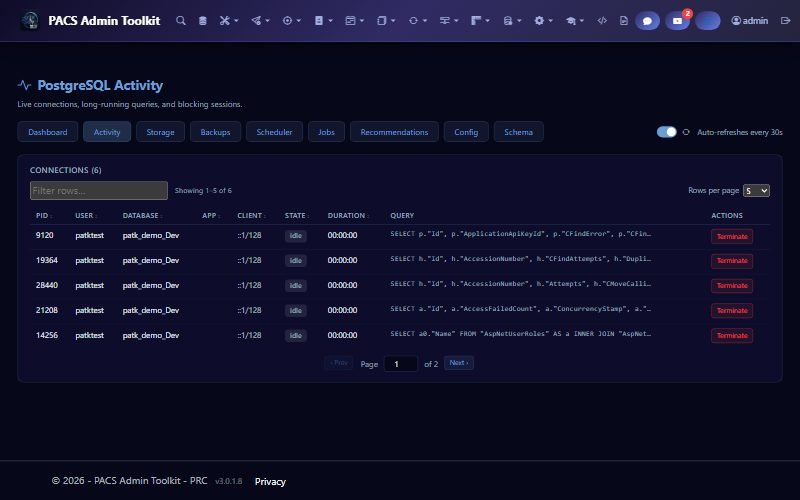
Every session with its program, machine, state and duration; long queries highlighted at 2 and 10 minutes; blocking chains show who holds everyone up, with Cancel and a typed-confirmation Terminate.
Storage you can act on
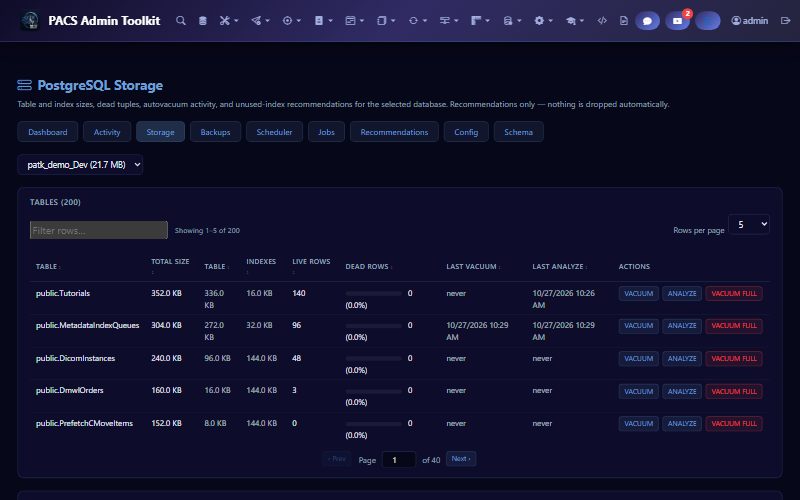
Tables by size, indexes and dead rows, with VACUUM, ANALYZE and REINDEX (including CONCURRENTLY) queued from the page, for one table or many at once.
Verified backups
pg_dump backups of one, several or all databases, plus logins, optionally zipped; each file is checked after it is written.
Backup retention and disk alerts
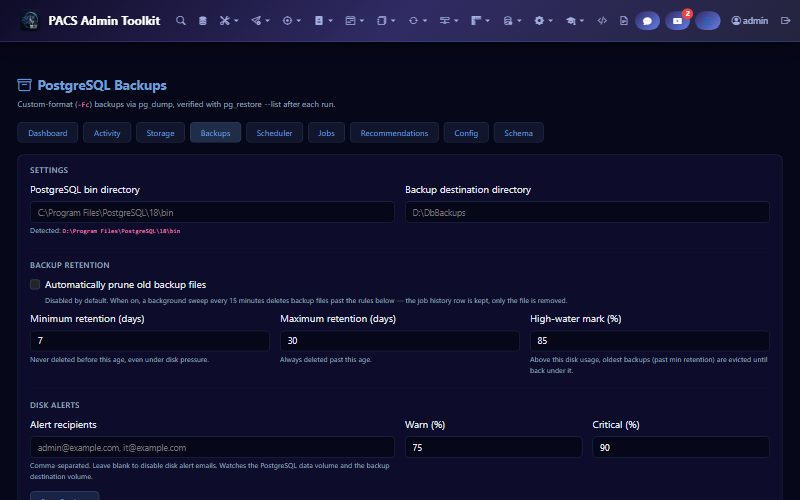
Optional pruning by maximum age and a high-water mark (never below a minimum age), and e-mails when the data or backup drive crosses warn (75%) or critical (90%).
Schedules without cron
Nightly backups and weekly VACUUM / ANALYZE on daily, weekly or monthly schedules; missed runs are made up within 6 hours.
One job at a time
A background runner takes the oldest queued job; the Jobs page keeps status, duration and full output of every run.
Recommendations in plain English
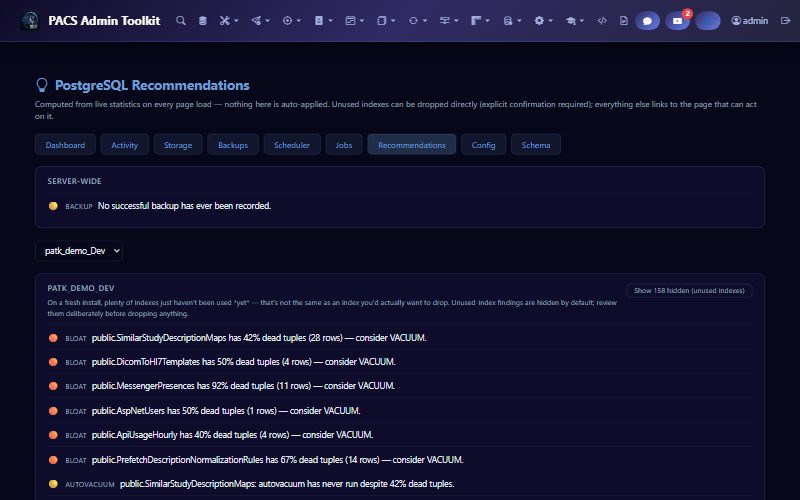
Bloat, autovacuum tuning, full-table scans with the queries behind them, unused indexes and stale backups, with preview SQL; unique and constraint-backed indexes are never offered for dropping.
A tuning advisor that knows the server
Memory settings are checked against the server's RAM and data size, and query statistics are switched on when missing. One pick-list runs the safe, online fixes together; anything that needs a restart or locks a table is listed for a maintenance window instead.
Indexes built from the evidence
For a table read end to end over and over, the advisor works out an index from the queries the database recorded, tests it against the query planner, and builds it online with one click, removing it again if it doesn't help. With too little evidence it says what is missing instead of guessing.
Index advice that waits for evidence
An index is only called unused after weeks of daily samples show its table was large and in regular use while the index went untouched, so features a site has not switched on yet never lose their indexes.
Settings and schema
View and change server settings with reload, stage restart-only settings for the next maintenance window, and browse every database's tables and columns.
Guard rails and audit
Every change is audited with the user name, high-risk actions need a typed phrase, and each action can be switched off per role.
How it works
- Read the statistics. Dashboard, Activity, Storage and Recommendations read what PostgreSQL already tracks, live.
- Queue a job. A button, Backup Now or a schedule adds VACUUM, ANALYZE, REINDEX or a backup to the queue.
- Run in the background. The job runner takes one job at a time, oldest first, checking every 5 seconds.
- Watch the drives. Disk alerts check every 5 minutes; backup retention every 15 minutes, when switched on.
- Review. The Jobs page and backup history show the outcome and full output of every run.
Use cases
"Is it the database?" during a slowdown
Challenge. Saves hang across the department at 10 a.m. and the PACS team cannot tell whether the database is involved.
With PATK. Activity shows one session idle in transaction for 20 minutes blocking a chain of others, named by program and machine; the admin cancels it and the blocked count returns to zero.
Outcome. A clear answer in minutes, and evidence for the owner of the stuck program to fix the cause.
Backups that are proven, not assumed
Challenge. The imaging database was backed up by a scheduled task nobody had checked in months.
With PATK. A nightly schedule backs up every database plus logins into one zip, verifies each file, prunes after 30 days and e-mails when the backup drive passes 75%.
Outcome. A morning check that takes two minutes, and a monthly test restore into a scratch database that turns a hope into a backup.
Planning disk before it fills
Challenge. Leadership asks how long the database drive will last after a new facility goes live.
With PATK. The 30-day growth chart and Storage show the slope and the biggest tables, and separate real growth from bloat a VACUUM can reclaim.
Outcome. A capacity estimate in weeks of headroom, raised well before the 75% warning.
Trust · Truth · Transform
Trust
Verified backups, disk alerts and safe defaults protect a database that clinical feeds depend on; dangerous actions ask first, need typed confirmation and are audited.
Truth
A health score, live sessions, blocking chains, sizes and growth show the real state of the server, so "is it the database?" has an answer.
Transform
Routine DBA work becomes schedules and a two-minute daily check that a PACS administrator can own.
Value model
An example single-server PATK install where routine database care was done by a contract DBA.
| Assumption | Example value |
|---|---|
| Routine database checks without PATK (monitoring, backups, maintenance, growth) | 4 hours a week |
| Share of that time the pages and schedules take over | 60% (about 125 hours a year) |
| Contract DBA rate | $110 per hour |
| Disk-full or stuck-session incidents caught early per year | 2 |
| Staff and downtime cost of one such incident, avoided | $4,000 |
| Estimated yearly value | $21,750 |
Illustrative only: every assumption is shown so you can replace it with your own numbers. Your results will differ.
Why it stands out
- Built for the people on call. Plain-English terms, healthy-versus-worrying thresholds and task guides, where general database tools assume a DBA.
- Inside the product it protects. No separate monitoring server, agent or license; the same login, roles and audit trail as the rest of PATK.
- Safe by construction. One job at a time, the app never restarts the database, only online fixes run from the tuning batch, unique indexes never offered for dropping, and per-role switches for every risky action.
- Backups with proof. Verification, retention rules and disk alerts in one place, instead of a scheduled task nobody watches.
At a glance
| Database | PostgreSQL server used by PATK (all its databases are shown) |
|---|---|
| Pages | Dashboard, Activity, Storage, Backups, Scheduler, Jobs, Recommendations, Config, Schema |
| Maintenance | VACUUM, ANALYZE, REINDEX (CONCURRENTLY), VACUUM FULL, autovacuum tuning per table |
| Backups | pg_dump per database, roles and users dump, zip sets, verification, retention by age and high-water mark |
| Alerts | Data and backup drive warn / critical e-mails (default 75% / 90%) |
| Controls | Typed confirmation for high-risk actions, per-role permissions, audit log for every change |
Screenshots
More in Platform & Integration
Core Platform
Sign-in, security, audit, help and setup that every PATK installation includes.
HL7 Messaging
Receive, log, edit and deliver HL7 with retries, ACK checks and a searchable record.
SFTP Transfers
Partner files collected on schedule, landed safely, and logged, with nobody logging in to fetch them.
External API
Keys for every system that calls PATK, and a clear view of what each one actually does.
Messenger
Real-time chat, group chats, presence and study links for everyone who works in PATK.
De-identification
Send studies and reports out under stable surrogates, and match the results back to the right patient.
Integration Engine
Channels that receive, filter, transform and route HL7 and DICOM to many destinations, built on the endpoints you already run.
Master Patient Index
Recognise one patient across facilities, IDs and systems, with the confidence and the reasons shown.
Not a medical device. PACS Admin Toolkit is not FDA-cleared or CE-marked and is not intended for primary diagnosis. It manages imaging and reporting data and workflows around the clinical systems that do.
Other product and company names may be trademarks of their respective owners. Screenshots show sample data. Value models are illustrative estimates, not guarantees.