 3T Consults and Coaching
Integration Engine
Channels that receive, filter, transform and route HL7 and DICOM to many destinations, built on the endpoints you already run.
An integration engine inside the toolkit. Each channel takes messages from one source, filters and transforms them with the same steps as the HL7 Field Editor and DICOM Tag Editor, and routes them to one or more destinations, using the HL7 listeners, HL7 destinations and DICOM listeners and destinations already set up. Channels run in their own Windows service with their own message database, so the existing tools keep working exactly as before.
The challenge
Radiology traffic rarely goes to one place. An order feeds the worklist, the reporting system and an analytics store; a study arrival should notify the RIS; a report has to reach two systems in two formats. Each new flow usually means a change request to a separate interface engine that radiology IT can't see into.
The messages are already arriving at the toolkit's HL7 and DICOM listeners. What is missing is a way to send them on, change them on the way and combine them, without rebuilding those listeners or risking the traffic they carry today.
What it does
Channels
One source, then filters, transformers and a router, then one or more destinations. Destinations run in parallel or in order, each with its own filter, transformer, queue, retries and response handling.
Built on what you have
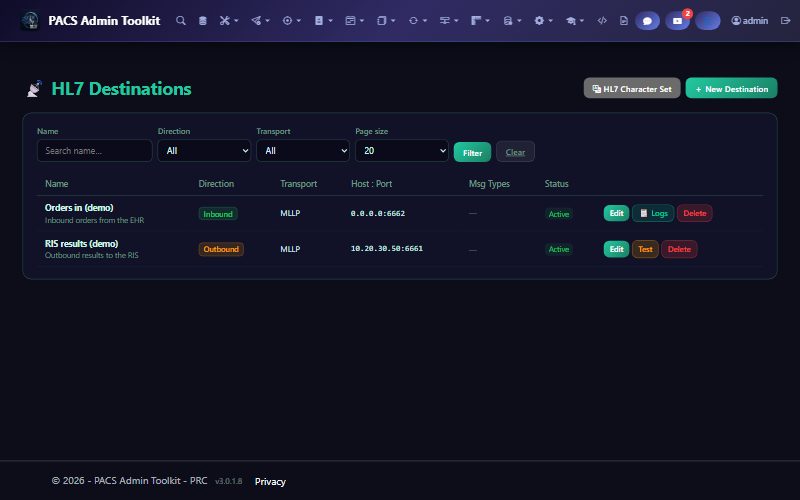
A channel can take a copy from an existing HL7 or DICOM listener, or send to an existing HL7 or DICOM destination, using the settings already saved there. The existing pages stay where they are and show which channels use them.
Attach without risk
An attached channel gets each message after the listener has stored and acknowledged it, so the sender's ACK never changes. Copies go through a durable inbox, and any copy missed is found again from the stored messages.
Familiar steps
Filters and transformers use the same words as the Field Editor and Tag Editor (copy, set, map, look up, date, age, de-identify, MPI …), and an existing Field Editor or Tag Editor template can run as a step unchanged.
Routing that adapts
Ordered rules send each message to every destination, a chosen list, names from a lookup table or an expression; deliver to all, to the first that succeeds, in failover order or load balanced; or hold a message on a review page until someone releases or discards it.
Combine and enrich
Look data up in a database, a lookup table, a PACS (C-FIND), the MPI, a web service or another channel while a message is processed, each with a timeout, a short cache and a fallback. Split a message into one per order or result, or collect related messages (an order, a study arrival, a report) into one.
DICOM in and out
Take images from an existing DICOM listener or a new port, one message per image or per completed study. Change tags with a Tag Editor template, build HL7 with a DICOM to HL7 template, and send on with C-STORE to an existing DICOM destination, with every send in the DICOM forward log.
Many connectors
MLLP and TCP, files (local, network share with its own sign-in, SFTP, FTPS), databases, e-mail, DICOM, HTTP / REST, FHIR R4 (including SMART backend sign-in), SOAP web services (operations read from the WSDL, WS-Security), ActiveMQ / Artemis queues, Teams and Slack notifications, PDF documents and PowerScribe order fields. Every connector has a Test button that checks it without sending a message.
Its own service and database
Channels run in the PATK Integration Engine Windows service and keep messages in their own database, on the same server or another, so message volume never weighs on the main database.
Shared port list
The engine checks every listener set up in the toolkit before it opens a port, and its ports appear in the toolkit's port map.
Encrypted secrets
Passwords, keys and connection strings are stored encrypted by name and never shown in a channel's settings. A connection builder writes database connection strings from plain fields, converts the JDBC addresses older engines use, tests them from the server, and keeps your connections, encrypted, to share with colleagues without showing the password.
Live statistics per channel
The dashboard updates as messages flow; each channel has charts of messages received, filtered, sent and failed, the time from arrival to each destination's send, and how many messages waited in each queue, from the last hour to the last 90 days. The same figures appear in Insights beside the other workflows.
Alerts that reach people
Rules for errors and error rate, growing queues, a feed gone quiet, a stopped channel, a failing destination, aggregator time-outs and a stopped engine server, sent by e-mail or to Teams, Slack or another webhook, with a delay, reminders, a resolved message and quiet hours.
More than one server
Run the engine service on several servers to share the channels out. When a server stops, the others take over its channels within 30 seconds and finish its messages where it stopped; a channel can be kept on one server or moved to another in a few seconds.
Engines you can see and control
One page shows every engine: its health, the channels it runs, message rates, queues and errors, live. Drain an engine before patching its server, restart or stop it, start it again, and limit a group of channels to chosen engines.
Add an engine without a project
A wizard checks the new server's details, then either downloads a ready package (with every password left out) or installs the engine over a remote session with a login used once and never saved, showing each step as it runs. The package's instructions list every command in order, and the key ring certificate goes along by itself. Engines already on the server are listed first, so a new one never takes another's folder or port. If the toolkit may not yet start an engine on another server, it can give itself that one right from the same page. A guided key ring setup makes sure an engine on a second server can read channel passwords before it is added. The app's installer can also install an engine on the web server, off unless ticked; upgrades keep it running on the same settings.
See every installed engine
The Engines page lists the engine services Windows has on each server and matches them with the running engines, flagging services that share a folder or port, stopped or silent engines, outdated engine files and leftover entries. Repair installs one again in place; Uninstall removes its service, and its folder if wanted, on that server from the same page.
Test with real-shaped messages, step by step
Try a draft channel before saving it with a message from anywhere: the sample library, a pasted or uploaded file, the channel's own stored messages, received HL7 messages or a local DICOM study. Every panel has the same sample at hand, and a step-by-step view shows the message after each step, side by side when its format changes. Nothing is sent. The message browser shows a stored message's stages the same way.
Fix and resend stored messages
Open a stored HL7 message, correct it in the HL7 editor with a view of every change, and send the corrected copy to all or chosen destinations. Or apply one change to hundreds of selected messages with a Field Editor template or quick field changes, preview the before and after, then resend. Every corrected copy is a new message linked to its original, which is kept.
Built for busy feeds
Several processing threads for feeds where order doesn't matter, message storage levels, and storage split by day, week or month so retention removes a whole period at once. Messages caught by a short database outage are finished automatically once it is back.
Move from the interface engine you use today
Import its channel exports: filters, transformers and scripts come across as steps, connectors map to the endpoints you already run, and passwords go straight into encrypted secrets. Every imported channel arrives disabled, with a report of what maps, what needs a look and what must be rewritten. The script layer has been checked against several hundred real, de-identified channels, so most scripts run unchanged.
Prove it before switching
Run saved messages from the current engine through an imported channel and see, per destination, every field that would differ. Then run the channel in shadow mode on a copy of live traffic: it processes everything, sends nothing, and its shadow report compares what it would have sent with what was really sent.
Cut over group by group
A cut-over page shows each group of channels with its readiness and latest shadow match, and lists the switch-over and rollback steps for that group. Nothing goes live until a person enables it.
How it works
- Pick a source. A new port, a folder or database, or a copy from an existing listener.
- Filter and transform. Build the steps on a real sample message and see each step's result, the routing decision and any lookups before saving. Pick fields by name (patient name, accession) from the sample or the full HL7 and DICOM catalogs instead of remembering paths.
- Choose destinations. Existing HL7 or DICOM destinations, or new ones; add routing rules if needed.
- Deploy. The engine service starts the channel; the dashboard shows its traffic and any errors.
Use cases
One ADT feed, three receivers
Challenge. Patient updates arrive once at a toolkit HL7 listener, but the worklist, the reporting system and an analytics store all need them, each slightly differently.
With PATK. A channel attaches to the existing listener and sends to three destinations, each with its own filter and Field Editor template. The listener itself is not touched.
Outcome. A new receiver is added in the browser, and a failure at one receiver never holds up the others.
Study arrival notifies the RIS
Challenge. The RIS needs to know when images for an order arrive, but nothing tells it today.
With PATK. A channel attached to the DICOM listener waits until each study has finished arriving, builds one HL7 notification for it with a DICOM to HL7 template and sends it to the existing RIS destination.
Outcome. Technologists and schedulers see arrivals without phone calls or manual checks.
De-identified copies for a research archive
Challenge. A research group needs a copy of selected studies without patient identifiers, and the copy must never leave with a real name by mistake.
With PATK. A channel takes a copy from the existing DICOM listener, keeps only the studies its filter selects, runs the department's de-identification Tag Editor template and sends the result to the research archive. If de-identification can't be completed, the image is stopped and shown as an error instead of being sent.
Outcome. The research feed runs on its own, and the clinical routing it copies from is not touched.
Results to a FHIR-based application
Challenge. A new clinical application takes results only through its FHIR API, but the reports leave the reporting system as HL7.
With PATK. A starter builds a channel that turns each HL7 result into a FHIR DiagnosticReport, checks it against the FHIR R4 specification and writes it to the application's FHIR server with the sign-in it requires. The id the server returns is kept with the message.
Outcome. The application receives results the day it is connected, and every sent report and server answer can be looked up per channel.
A backup receiver and a second look
Challenge. Results must reach the reporting system even when its interface is down, and messages for restricted patients should be checked by a person before they go anywhere.
With PATK. A routing rule sends results to the primary receiver with a backup in failover order, and a second rule holds messages for flagged patients on the review page. A reviewer releases or discards each one.
Outcome. Delivery continues through an outage without manual re-sends, and sensitive messages leave only after someone has looked.
Leaving the old interface engine without a big bang
Challenge. Dozens of interfaces run on an engine the department wants to retire, and nobody can say for sure that a rebuilt interface sends exactly the same messages.
With PATK. The channels are imported, disabled, with a report of what needs attention. Each one runs in shadow mode next to the old engine for a week; the shadow report shows the share of messages that came out the same and every field that differs. Groups move one at a time, following generated switch-over steps, with rollback steps ready.
Outcome. Each interface moves on evidence, a group at a time, and the old engine stays ready to take a group back until the move is proven.
Interfaces that keep running during maintenance
Challenge. Patching the interface server means a maintenance window, and a server that fails at night stops every feed until someone notices.
With PATK. The engine service runs on two servers. Channels are shared between them; when one server is patched or fails, the other takes over its channels and finishes the messages it was working on. An alert tells the team that a server stopped and when it is back.
Outcome. Servers are patched one at a time during the day, and a failed server no longer means lost or late messages.
Trust · Truth · Transform
Trust
Existing listeners, destinations and queues are never changed; channels run in their own process with their own database, copies taken from a listener are never lost or duplicated, and a second server takes over when one stops.
Truth
Every message, each step's result, every send and every response is kept and searchable per channel.
Transform
New flows, conversions and fan-outs are built in the browser by the radiology IT team, with the steps they already use.
Value model
An example radiology department that sends new interface requests to a separate interface team.
| Assumption | Example value |
|---|---|
| New or changed radiology interface flows per year | 12 |
| Analyst time saved per flow by building it in the toolkit | 8 hours |
| Interface troubleshooting questions per month answered from channel logs | 10 |
| Time saved per question | 30 minutes |
| Blended IT / interface analyst cost per hour | $60 |
| Avoided interface engine licence or channel build costs per year | $15,000 |
| Estimated yearly value | $24,360 |
Illustrative only: every assumption is shown so you can replace it with your own numbers. Your results will differ.
Why it stands out
- Next to the data it moves. Channels sit beside the listeners, routing, worklist and MPI they work with, in one product radiology IT already runs.
- Reuse instead of rebuild. Existing endpoints, Field Editor and Tag Editor templates and lookup tables are used as they are.
- Safe by design. Attaching a channel can't change what an existing listener stores or acknowledges.
- Licensed on its own. Sites that license only HL7 messaging see exactly what they see today. An engine on an app server adds nothing; a server that runs only engines counts once toward the server limit.
At a glance
| Sources | MLLP / TCP, files, databases, copies from existing HL7 and DICOM listeners, HTTP, FHIR, web services, message brokers |
|---|---|
| Destinations | Existing HL7 and DICOM destinations, MLLP / TCP, files, databases, e-mail, HTTP, FHIR, web services, message brokers, webhooks, PDF documents, PowerScribe order fields |
| Processing | Filters, Field Editor and Tag Editor steps, lookup tables, enrichment (database, web service, C-FIND, MPI), rule, lookup and failover routing, hold for review, split and aggregation |
| Operation | Separate Windows service on one or more servers with automatic failover, an engines page with drain, restart, stop and start, an add-an-engine wizard and an optional install with the app, separate message database with time-split storage for busy channels, live statistics, alerts by e-mail and webhook, health check, shared port list, encrypted secrets |
| Migration | Channel import with a mapping report, comparison against saved messages, shadow mode on live copies with a shadow report, group-by-group cut-over checklists |
Screenshots
More in Platform & Integration
Core Platform
Sign-in, security, audit, help and setup that every PATK installation includes.
HL7 Messaging
Receive, log, edit and deliver HL7 with retries, ACK checks and a searchable record.
SFTP Transfers
Partner files collected on schedule, landed safely, and logged, with nobody logging in to fetch them.
PostgreSQL Admin
Keep the database behind a 24/7 imaging service healthy, backed up and explainable, without a full-time DBA.
External API
Keys for every system that calls PATK, and a clear view of what each one actually does.
Messenger
Real-time chat, group chats, presence and study links for everyone who works in PATK.
De-identification
Send studies and reports out under stable surrogates, and match the results back to the right patient.
Master Patient Index
Recognise one patient across facilities, IDs and systems, with the confidence and the reasons shown.
Not a medical device. PACS Admin Toolkit is not FDA-cleared or CE-marked and is not intended for primary diagnosis. It manages imaging and reporting data and workflows around the clinical systems that do.
PowerScribe is a trademark of its respective owner; it is named only to describe compatibility. No endorsement is implied.
Other product and company names may be trademarks of their respective owners. Screenshots show sample data. Value models are illustrative estimates, not guarantees.