 3T Consults and Coaching
External API
Keys for every system that calls PATK, and a clear view of what each one actually does.
Application API keys and JWT API users let RIS, EHR, portals and scripts call PATK with their own credentials, roles and facility scope. API Usage meters every call by caller, user, endpoint and IP, and keeps the reason for every failure.
The challenge
Every integration starts with a shared password in an email and ends with nobody sure which systems still use it. When an EHR launch or a portal call starts failing, the PACS team hears about it from users, then spends hours working out which caller, which endpoint and which error.
Most imaging tools leave API access to a single shared account and their logs to a text file. There is no way to say how much each system calls, from where, or for whom, and no way to limit an affiliate's system to its own data.
What it does
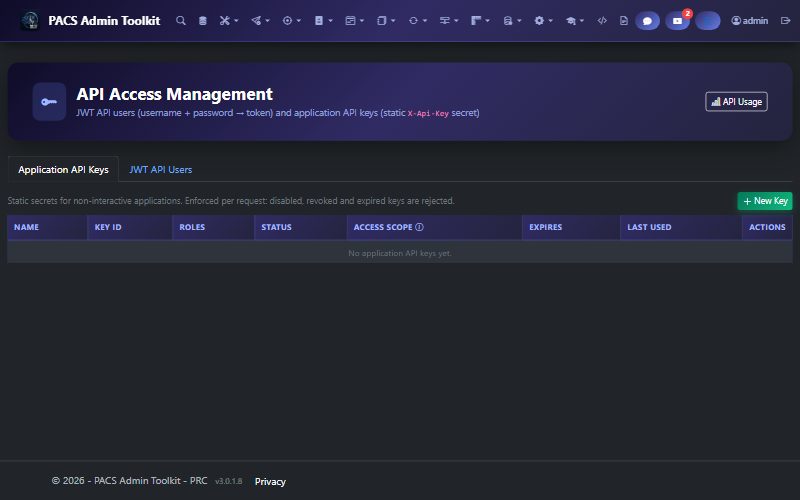
Application API keys
Each calling system gets its own key, sent in the X-Api-Key header; the secret is shown once and only a hash is stored.
JWT API users
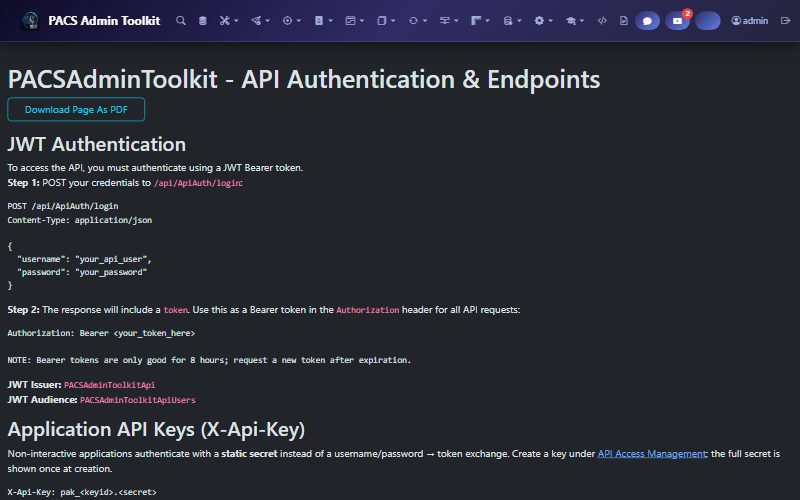
Systems that prefer a login exchange a username and password for a bearer token valid for 8 hours.
Roles and scope per caller
Each key or JWT user carries its own roles, and can be limited to chosen facilities or sites wherever Access Topology is enforced.
Full key lifecycle
Optional expiry dates, disable, rotate (the old secret stops at once) and revoke, with the record kept for history.
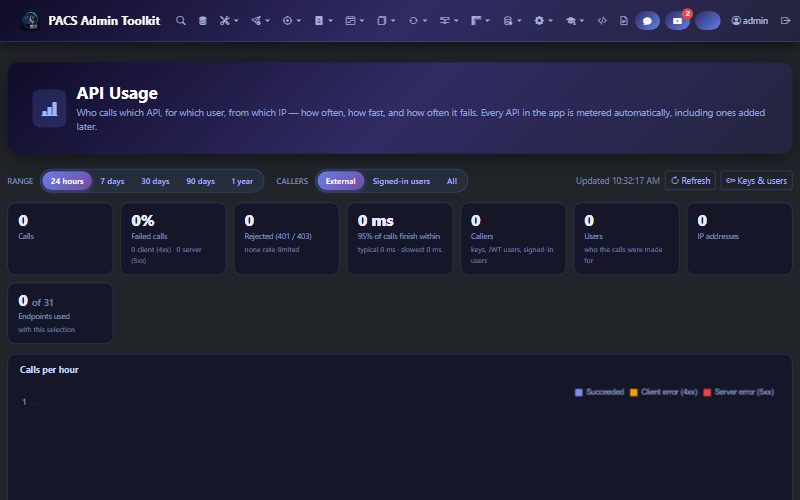
Usage, metered automatically
Every API in the app is counted by caller, the user the call was made for, endpoint and IP, including APIs added in later versions.
Answers, not just counts
Tiles show calls, failed share, rejected calls, the 95th-percentile response time, callers, users and IPs; charts show calls over time and the busiest hours.
Why a call failed
Each failed call keeps a short reason for 30 days: the server exception, the key or token rejection, or the error text the API answered; values that look like secrets are masked.
"Worth a look" signals
The usage page points out patterns that need attention, and one click filters the whole page to an endpoint, caller, user or IP.
A reference for integrators
API Details documents sign-in and the available endpoints and can be saved as a PDF.
How it works
- Issue credentials. Create a key or JWT user for the calling system, with roles, expiry and scope.
- System calls. The RIS, EHR or portal sends its key or token with each request.
- Checked and scoped. PATK checks the credential and its roles, and limits records to its scope.
- Metered. Counts are written every 30 seconds and kept as hourly totals; failures keep their reason.
- Reviewed. API Usage shows who calls what, how fast and how often it fails.
Use cases
EHR context launch of prior studies
Challenge. Clinicians open priors from the EHR, and the integration team needs its own credential that can be rotated without breaking other systems.
With PATK. The EHR gets an application key with the priors role (the launch itself needs the Priors Fetch toolset); API Usage shows its launches per day and any failures.
Outcome. One credential per system, rotated on a schedule, with launch volume and errors visible instead of reported by users.
Affiliate imaging centre portal
Challenge. An affiliated imaging centre's portal calls PATK, but must only ever reach that centre's data.
With PATK. Its key gets scope rows for the centre's facility; wherever access is enforced, the key sees only those records.
Outcome. The affiliate integrates directly, with no risk of reaching another facility's patients and an audit of everything it called.
One metered entry point for a multi-site radiology group
Challenge. A multi-site radiology group has several systems that need imaging functions, and didn't want each one wired separately to the PACS with its own credentials and no shared view of traffic.
With PATK. The group uses PATK's External API as a passthrough: each system calls PATK with its own key, and PATK handles the imaging side.
Outcome. Every system's traffic shows up on one usage page, by caller and endpoint, and access can be changed or revoked per system without touching the others.
"The integration stopped working"
Challenge. A vendor reports intermittent failures after an upgrade on their side, and nobody can tell which calls fail.
With PATK. API Usage filtered to the vendor's caller shows the failed calls grouped by status and reason, the endpoint and the IP they came from.
Outcome. The cause (an expired key, a validation error, a wrong endpoint) is clear in minutes and the conversation with the vendor starts with evidence.
Trust · Truth · Transform
Trust
Secrets are shown once and stored as hashes, each caller has its own roles and facility scope, rotation stops the old secret immediately, and API calls are audited.
Truth
See every caller, user, endpoint and IP, the failure rate and response times, and the exact reason each call failed over the last 30 days.
Transform
Integrations are issued, rotated and diagnosed from one page, instead of shared passwords, log-file searches and calls with the vendor.
Value model
An example department with four systems calling PATK (EHR, RIS, portal and scripts).
| Assumption | Example value |
|---|---|
| Systems calling PATK APIs | 4 |
| Integration incidents per year, hours saved on each with failure reasons by caller | 24 x 2 hours (48) |
| Key onboarding and rotation tasks per year, hours saved on each | 8 x 2 hours (16) |
| Monthly usage reports for governance or billing, hours saved on each | 12 x 3 hours (36) |
| Blended integration and PACS administrator cost per hour | $65 |
| Separate API metering or gateway subscription avoided per year | $10,000 |
| Estimated yearly value | $16,500 |
Illustrative only: every assumption is shown so you can replace it with your own numbers. Your results will differ.
Why it stands out
- Metering is built in. Every endpoint is counted without configuration, where an add-on gateway or custom logging has to be set up per API.
- Failures explained. The reason is kept with each failed call, so diagnosis does not depend on searching server log files.
- Scoped to facilities. Keys follow the same facility and site model as people when Access Topology is licensed, rather than all-or-nothing access.
- Part of the same platform. Keys, usage, audit and the APIs themselves live in one product with one support contract.
At a glance
| Credentials | Application API keys (X-Api-Key), JWT API users (bearer token, 8 hours) |
|---|---|
| Controls | Roles per caller, facility / site scope, expiry, disable, rotate, revoke |
| Usage | Calls, failed and rejected calls, 95th-percentile response time, callers, users, IPs, endpoints |
| Detail | Calls over time, busiest hours, endpoint / caller / user / IP tabs, recent errors with reasons (30 days) |
| Documentation | API Details reference, saveable as PDF |
| Licensing | API calls usage meter: only successful external calls to endpoints that do real work count; the app's own pages, messaging, sign-in and license checks never do |
Screenshots
More in Platform & Integration
Core Platform
Sign-in, security, audit, help and setup that every PATK installation includes.
HL7 Messaging
Receive, log, edit and deliver HL7 with retries, ACK checks and a searchable record.
SFTP Transfers
Partner files collected on schedule, landed safely, and logged, with nobody logging in to fetch them.
PostgreSQL Admin
Keep the database behind a 24/7 imaging service healthy, backed up and explainable, without a full-time DBA.
Messenger
Real-time chat, group chats, presence and study links for everyone who works in PATK.
De-identification
Send studies and reports out under stable surrogates, and match the results back to the right patient.
Integration Engine
Channels that receive, filter, transform and route HL7 and DICOM to many destinations, built on the endpoints you already run.
Master Patient Index
Recognise one patient across facilities, IDs and systems, with the confidence and the reasons shown.
Not a medical device. PACS Admin Toolkit is not FDA-cleared or CE-marked and is not intended for primary diagnosis. It manages imaging and reporting data and workflows around the clinical systems that do.
Other product and company names may be trademarks of their respective owners. Screenshots show sample data. Value models are illustrative estimates, not guarantees.