 3T Consults and Coaching
Messenger
Real-time chat, group chats, presence and study links for everyone who works in PATK.
Built-in instant messaging with live presence, so technologists, PACS administrators and IT reach each other without phone tag. A study link opens the exact study being discussed.
The challenge
A technologist has a study that didn't route, a wrong patient name or a modality that can't find its worklist. The PACS administrator is somewhere else in the building. What follows is a phone call that goes to voicemail, a page, a call back, and then reading an accession number aloud, letter by letter.
General-purpose chat tools help, but they sit outside the imaging workflow: nobody knows who is at which workstation, and pasting a patient name into a consumer chat app is not something the privacy office wants to see.
What it does
Live presence
Everyone appears as online, away, do not disturb or offline; people go to away after 10 minutes idle, and do not disturb stays until they change it.
Know who is where
Each person can show a label such as their workstation or room, and the roster is grouped by team (Messenger groups set by an administrator).
One-to-one chat in the app
Chat windows float over whatever page you are on, can be moved and resized, and up to four stay open at once.
Group chats
Start a chat with several people at once, name it, add people later or leave it. Each message shows who sent it, and everyone keeps their own unread count. A group chat's messages are cleared once everyone in it has been offline for 10 minutes.
Images stored once
A screenshot pasted into a group chat is saved once and streamed to each person who opens it, so a large group doesn't multiply its size.
Nothing missed
Messages are kept, so people who were offline find them on return; unread counts show on the top-bar button and per person, with the recent history in each window.
Study links
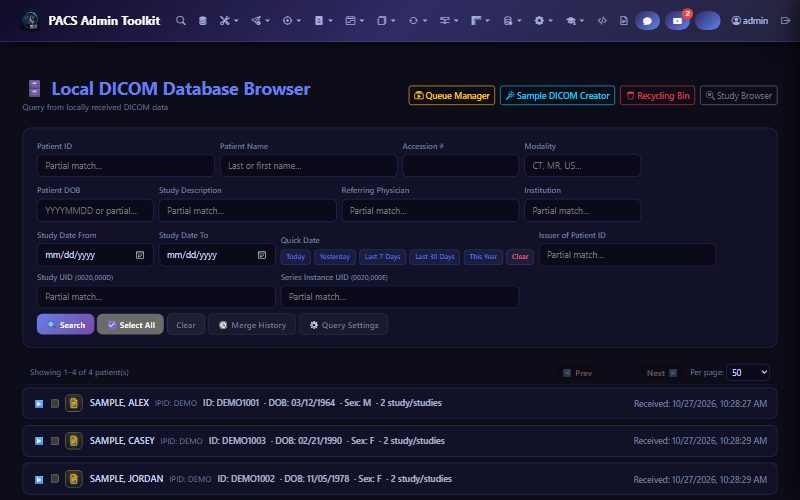
Insert one of your recently opened studies as a link; the recipient clicks it and the study opens in the Local Database Browser.
Show, don't describe
Paste a screenshot straight into a message; images are resized before sending and open full size with one click.
Make urgent things stand out
Bold, italic, underline, colour, font and size, plus a one-click red bold style for urgent notes.
Respects facility privacy
With Access Topology enforced for Messenger, people see and can message only colleagues who share a facility with them (plus Global staff), and study links only list studies the sender can see.
How it works
- Sign in. Messenger connects in the background on every page of PATK.
- Presence shared. Status and workstation label update live for the people who can see you.
- Message sent. The message is stored and delivered at once, or waits for the recipient to return.
- Study linked. A recent study goes in as a link that opens the study itself.
Use cases
Technologist to PACS administrator
Challenge. A CT technologist sees that a study did not reach the PACS and can't leave the scanner to find anyone.
With PATK. They see the PACS administrator is online, send the study as a link with a screenshot of the error, and keep scanning.
Outcome. The administrator opens the exact study from the message and starts on it, with no phone tag and no accession read aloud.
Night shift across several sites
Challenge. One PACS administrator covers three sites overnight; staff don't know whether to call, page or wait.
With PATK. Workstation labels and presence show who is on and where; do not disturb is visible while the administrator is on a long task.
Outcome. Requests arrive in one place, in writing, and wait safely until they can be handled.
A shared PACS for several hospitals
Challenge. Two hospitals share one PATK installation, and staff of one hospital must not browse the other's staff or patients.
With PATK. With Messenger enforced under Access Topology, each hospital's staff see their own colleagues and the central Global team only.
Outcome. Everyday chat with the central PACS team, with each facility's privacy kept.
Trust · Truth · Transform
Trust
Messages stay inside your own installation and database, behind the same sign-in, and follow facility boundaries when Access Topology is enforced.
Truth
Live presence and workstation labels show who is available and where, and a study link points at the exact study, not a description of it.
Transform
Phone tag, pages and spelled-out accession numbers become a quick written message with a link the recipient can act on.
Value model
An example imaging department with 60 people using PATK across technologists, PACS administrators and IT.
| Assumption | Example value |
|---|---|
| People using Messenger | 60 |
| Messages per day that replace a phone call, page or walk | 40 |
| Time saved per message compared with phone tag | 3 minutes |
| Working days per year | 250 |
| Staff hours saved per year | 500 |
| Blended staff cost per hour | $45 |
| Estimated yearly value | $22,500 |
Illustrative only: every assumption is shown so you can replace it with your own numbers. Your results will differ.
Why it stands out
- Inside the workflow. Chat lives in the same tool where studies, routes and worklists are fixed, rather than in a separate chat application.
- Study-aware. Links open the study itself, which general chat tools can't do.
- Nothing extra to run. No chat server, client install or separate accounts; people use their existing PATK sign-in.
- Privacy by facility. Follows the same facility and site model as the rest of PATK when Access Topology is licensed.
At a glance
| Messaging | One-to-one and group chats, stored messages, unread counts, recent history per conversation |
|---|---|
| Presence | Online, away (10 minutes idle), do not disturb, offline; workstation label; roster groups |
| Content | Formatted text, pasted images (resized, full-size view), links to recently opened studies |
| Interface | Floating, movable and resizable windows, up to four at once, on every page |
| Scoping | Facility-based roster and study links when Access Topology enforces Messenger |
| Delivery | Real-time push inside the PATK web application; no separate client |
Screenshots
More in Platform & Integration
Core Platform
Sign-in, security, audit, help and setup that every PATK installation includes.
HL7 Messaging
Receive, log, edit and deliver HL7 with retries, ACK checks and a searchable record.
SFTP Transfers
Partner files collected on schedule, landed safely, and logged, with nobody logging in to fetch them.
PostgreSQL Admin
Keep the database behind a 24/7 imaging service healthy, backed up and explainable, without a full-time DBA.
External API
Keys for every system that calls PATK, and a clear view of what each one actually does.
De-identification
Send studies and reports out under stable surrogates, and match the results back to the right patient.
Integration Engine
Channels that receive, filter, transform and route HL7 and DICOM to many destinations, built on the endpoints you already run.
Master Patient Index
Recognise one patient across facilities, IDs and systems, with the confidence and the reasons shown.
Not a medical device. PACS Admin Toolkit is not FDA-cleared or CE-marked and is not intended for primary diagnosis. It manages imaging and reporting data and workflows around the clinical systems that do.
Other product and company names may be trademarks of their respective owners. Screenshots show sample data. Value models are illustrative estimates, not guarantees.