 3T Consults and Coaching
Study Sharing
Share stored studies with patients, referring doctors and sites, and record every look.
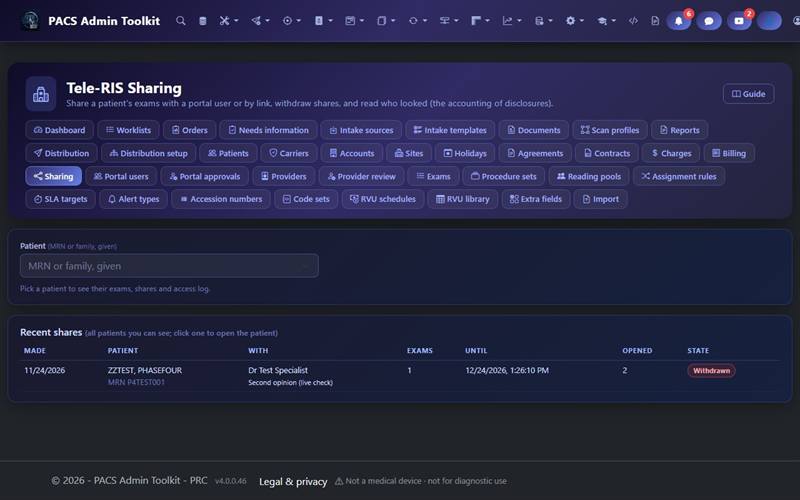
Share studies held in your image store with people outside: patients, referring providers and the sites you read for. Only verified recipients, a second check on every link, an end date on every share, and a record of every view and download that you can export.
The challenge
A referring doctor wants the images for a second opinion; a patient moving to another city wants their studies; a site needs one exam before a procedure. The usual answers are a CD in the post, a large file sent by e-mail or a consumer file-sharing link: slow, hard to withdraw and impossible to account for afterwards.
Privacy rules expect a clinic to know who received which images, when, and why. A link that anyone can forward, with no end date and no record of who opened it, gives no such answer.
What it does
Studies from your own store
A share holds chosen studies from the local image store, or all of one patient's studies, with or without their reports.
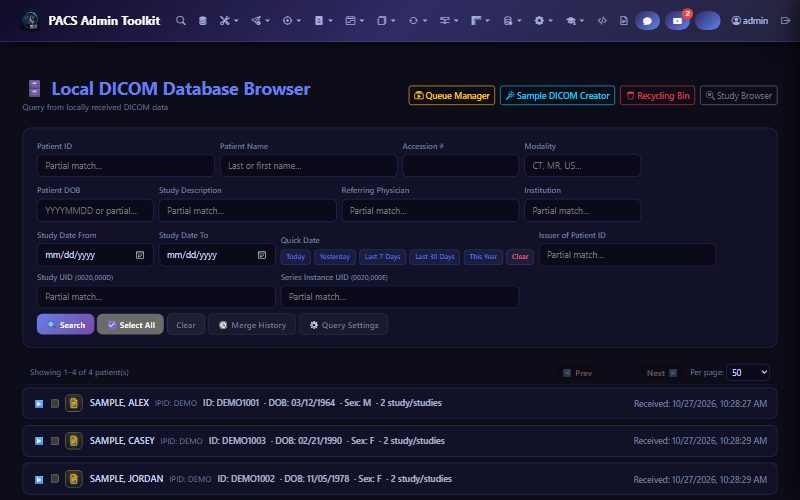
Share straight from the image browser
Tick patients or studies, press Share outside, pick the recipients and see a preview of which studies go to whom before anything is sent. Several patients become one share per patient for each recipient, so nobody sees another patient's images through one link.
The referring doctor suggested
The study's referring physician is looked up in your provider directory and offered as a recipient. It is added by itself only when the match is certain (provider number, code or a name your staff confirmed before); otherwise staff pick from the likely matches.
Verified recipients only
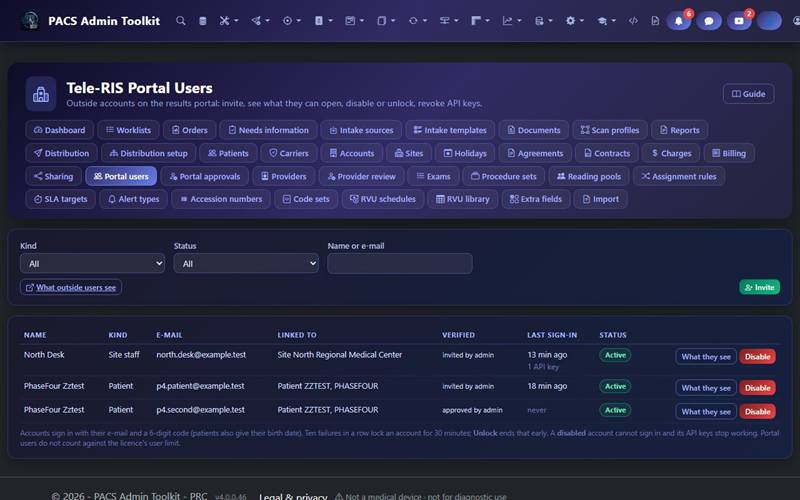
Shares go to active portal accounts and to e-mail addresses and mobiles whose owner confirmed a one-time code. An unconfirmed address waits until its owner registers on the portal and is approved.
A second check on every link
A link opens with a one-time code texted to the recipient, a sign-in to their portal account, the patient's birth date or a one-time code e-mailed to them. Five wrong answers lock the link for good.
E-mailed links use another channel
A link sent by e-mail opens only with a texted code or a portal sign-in, so reading the mailbox alone is not enough. A code e-mailed to the same mailbox is allowed only if an administrator chooses it, with a warning. The rule is checked when the share is made and every time the link is opened.
A second step for providers and site staff
Referring providers and site staff confirm each portal sign-in with an authenticator app or a texted code, set up at their first sign-in with one-time recovery codes; staff can reset a lost phone, and every step is audited. Patients keep an e-mailed code and their birth date.
Only the portal is exposed
The portal is one fixed, small set of addresses, listed in the guide for your reverse proxy, so staff pages never need to be reachable from outside. An optional switch makes the app answer the portal only for the local network and paired portal gateways, and listed reverse proxies keep the visitor's own address in the disclosures.
Portal gateways for the DMZ
A small portal server for Windows or Linux, paired from the app with a one-time code, puts the portal on the internet while holding no patient data. By default the main server connects out to it (tunnel mode), so no firewall rule into the internal network is needed. It passes on only the portal, signs every request, shows its health and open connections, and can be tested, re-paired or revoked from the Portal servers page at once. It installs from a signed Windows installer or a Linux package (pairing can be part of an unattended install), takes its certificate from an upload or Let's Encrypt with automatic renewal, checks it with Test TLS, and updates from the app with a signature check and automatic roll-back.
An end date on every share
30 days unless you choose otherwise, a year at most, optionally a limit on how often it opens. Withdraw a share and every link stops at once.
Exactly the studies shared
Each study is pinned to its stored record, its unit and its patient. If it is later removed, recycled or moved, the recipient sees that it is no longer available and never another copy.
A locked viewer
The recipient steps through the images in the browser, reads the report when one is linked and shared, and downloads the DICOM files only when the share allows it.
Every look recorded
Each view, image, download and failed check is recorded with who, what, when and the network address, shown on the share and exportable as a CSV accounting of disclosures.
Nothing sensitive in the e-mail
Share e-mails carry a link or a code only, never images or results, and mail with patient information requires an encrypted connection unless you choose otherwise.
How it works
- Pick the studies. Tick patients or studies in the image browser: only those you are allowed to see and none in the recycle bin. Sharing needs its own staff permission.
- Pick the recipients. Active portal accounts or verified contacts of the patient, the referring doctor (suggested) and the sites; an unverified address becomes a pending recipient.
- Choose what they may do. Report, images, download, the end date, how often it may be opened, the check a link asks for and an optional note, then check the preview.
- They open it. By signing in to the portal, or through a link and its second check.
- You see every look. The share lists its studies, their state and its disclosures, ready to export.
Use cases
Second opinion
Challenge. A specialist at another hospital needs a patient's CT and MR for a second opinion this week.
With PATK. The two studies are shared with the specialist's verified address for 14 days, images and download allowed; the e-mailed link opens with a code texted to the specialist's verified mobile.
Outcome. No CD, no courier; the clinic can show exactly when the images were opened and downloaded.
Patient copy
Challenge. A patient moving away asks for all of their imaging.
With PATK. All of the patient's stored studies are shared with their portal account, with download allowed for 30 days.
Outcome. The patient takes their images to the new provider without a disc, and the request is on record.
A study corrected after sharing
Challenge. A study shared with a site turns out to be filed under the wrong record and is moved.
With PATK. The share shows the study as no longer available, and the recipient sees nothing of it.
Outcome. A correction in the store takes effect for the recipient at once.
Trust · Truth · Transform
Trust
Verified recipients, a second check on links from another channel, a second step for providers and site staff, end dates, withdrawal that works at once, and studies pinned to their record and unit.
Truth
Every view, image, download and failed check is recorded with who, what, when and from where, per share and per patient.
Transform
Discs and ad-hoc file links become shares that end on their own and account for themselves.
Value model
An example imaging centre that today burns and posts discs for outside requests.
| Assumption | Example value |
|---|---|
| Outside image requests per year | 2,400 |
| Share of requests that can be met with a share instead of a disc | 70% (1,680) |
| Staff time per disc (burn, label, log, post) | 12 minutes |
| Staff time per share | 3 minutes |
| Staff time saved | 9 minutes × 1,680 = 252 hours |
| Blended staff cost per hour | $40 |
| Disc, case and postage per request | $6 |
| Estimated yearly value | $20,160 (252 hours × $40 + 1,680 × $6) |
Illustrative only: every assumption is shown so you can replace it with your own numbers. Your results will differ.
Why it stands out
- Your store, your copy. Images are served from the store you already run; no outside service keeps a copy.
- Accountable by design. Compared with e-mail or consumer file links, every share has a recipient that was checked, an end date and a record of every look.
- Same platform. Recipients, portal accounts, contact verification, audit and licensing are shared with the rest of PATK.
At a glance
| What can be shared | Chosen studies or whole patients from the local store, picked in the image browser (one share per patient per recipient); report when linked |
|---|---|
| Recipients | Active portal accounts (patients, referring providers, site staff), verified e-mail addresses and mobiles, pending recipients who must register and be approved |
| Second check | One-time code by text (when texting is set up with its business associate agreement), portal account sign-in, patient's birth date (links handed over by staff), one-time code by e-mail (e-mailed links only if an administrator allows it) |
| Portal sign-in | E-mailed one-time code; patients add their birth date; providers and site staff add an authenticator app code (or a texted code) with one-time recovery codes, required by default |
| Limits | End date (30 days by default, a year at most), optional open limit, withdraw at once, five wrong answers lock a link |
| Viewer | Images as pictures in the browser (largest side 1,600 px, metadata removed), report text and PDF, DICOM ZIP only when allowed |
| Safety | Studies pinned to their record, Study Instance UID, owner unit and patient; recycle bin respected; no longer available once removed or moved |
| Disclosures | Every view, image, download and failed check with who, what, when and network address; per share and per patient; CSV export (audited) |
| Link or code only; patient-data mail requires an encrypted connection unless an administrator confirms a private relay | |
| Outside access | Portal-only allow list for your reverse proxy, or a paired portal gateway (Windows installer or Linux package, no patient data, outbound tunnel with no inbound firewall rule or direct connection, signed requests, uploaded or Let's Encrypt certificates with Test TLS, in-app updates with roll-back, health and alerts, Test now) |
Screenshots
More in Reports & Results
DICOM to HL7
Images and reports arriving as DICOM become the HL7 messages your RIS and EHR expect.
SR Measurements to HL7
Ultrasound, echo and DEXA measurements flow into results, PowerScribe and PDFs, not retyped.
Report to SR
Put the report in the PACS beside its images, from HL7 feeds or historic report files.
SR Sync
Find the structured reports that never arrived, and move them where they belong, on a timetable.
PDF to Secondary Capture
Encapsulated PDFs in, viewable DICOM images out, sent on to the PACS without a click.
Not a medical device. PACS Admin Toolkit is not FDA-cleared or CE-marked and is not intended for primary diagnosis. It manages imaging and reporting data and workflows around the clinical systems that do.
Other product and company names may be trademarks of their respective owners. Screenshots show sample data. Value models are illustrative estimates, not guarantees.