 3T Consults and Coaching
Report to SR
Put the report in the PACS beside its images, from HL7 feeds or historic report files.
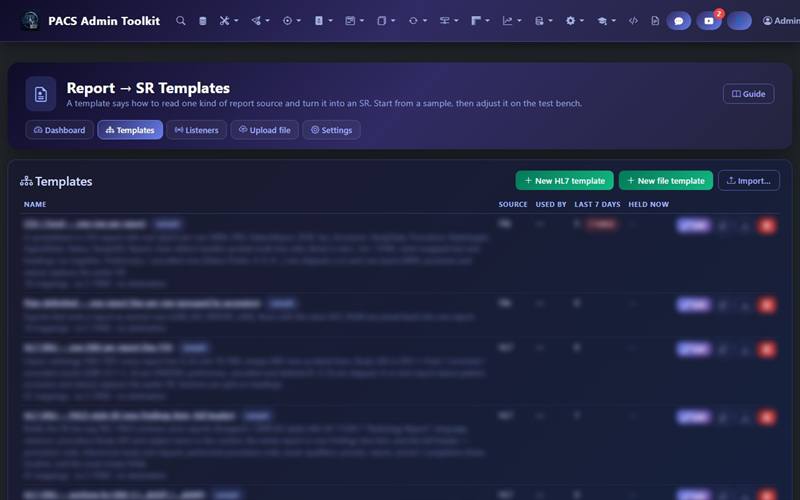
Turns HL7 ORU reports and CSV, Excel or delimited report files into DICOM Basic Text SR in the layout RIS and PACS archives use. A C-FIND finds the images' Study UID, and held or failed reports wait on a dashboard until someone acts.
The challenge
A PACS that holds images but not reports sends people to a second system every time they open a prior. After a migration, a merger or a RIS change, years of reports may exist only as an export file nobody can load.
Turning reports into DICOM SR sounds simple until the real data arrives: line breaks lost in transit, headings run together, missing Study UIDs, preliminary and corrected results, and exams that reach the PACS after their report.
What it does
Two kinds of source
HL7 ORU messages from a TCP listener or a file of messages, and flat files: CSV, Excel, pipe or any delimited text.
Templates you can read
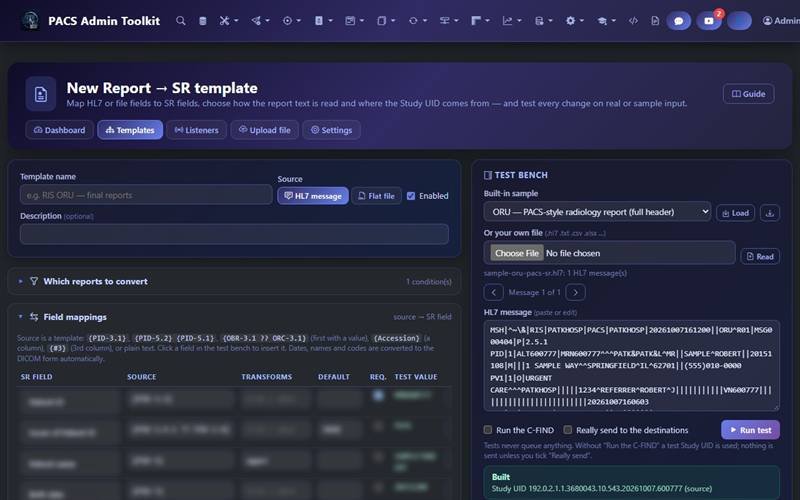
Each SR field is filled from a source template such as or , with fallbacks, transforms and automatic DICOM date, name and code formatting.
Report text cleaned up
Automatic detection handles HL7 escapes, HTML and RTF, typed line-break markers, run-together headings and hard-wrapped lines, and shows what it found; it can also add a signature line from the verifying radiologist when the sender leaves it out.
Sections when you want them
One Findings section, as most archives store reports, or coded sections for History, Comparison, Technique, Findings, Impressions, Recommendations and Addendum.
Study UID by C-FIND
Take the UID from the source or query one or more PACS routes with ordered queries that always include the patient ID; optionally copy demographics from the matched study.
The archive's layout
Basic Text SR with the usual header, procedure and referenced request sequences, verification flags and verifying observer.
A rule for every failure
Missing values, unreadable dates, empty reports, no study found, duplicates and failed sends each choose hold, retry, generate, skip or fail. Templates that receive the same reports by two routes can share duplicate checking.
Delivery with retries
C-STORE to every destination or the first that accepts, retried on a schedule with the same SOP Instance UID; a copy can also go to a folder.
A test bench
Run a sample, a pasted message or your own file through every step and see the cleaned text, SR header and full DICOM dump; nothing is sent unless you say so.
See the study at a glance
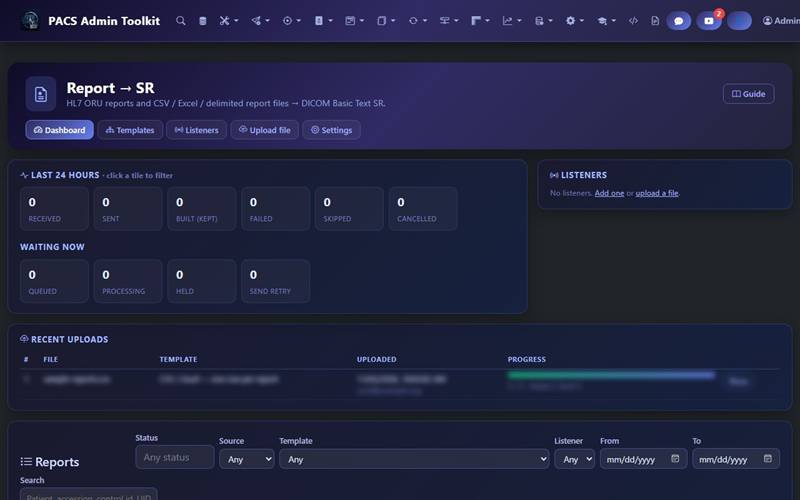
Each report on the dashboard shows the accession with the study description, modality and date under it, so most can be judged without opening them.
A list when you need one
Export the reports matching the dashboard filters to Excel or CSV, with the columns you choose.
How it works
- Receive. A listener or file upload saves every report before anything else happens.
- Map. The template copies source fields into the SR header and reads the report text.
- Find the study. The Study UID comes from the source or a C-FIND on a DICOM route.
- Build. A Basic Text SR is built in the RIS / PACS layout and kept on disk.
- Send. C-STORE to the destinations, with retries; held and failed reports wait on the dashboard.
Use cases
RIS reports into the PACS, live
Challenge. A hospital network's RIS sends ORU^R01 with one OBX per line and no Study UID; the PACS shows images without reports.
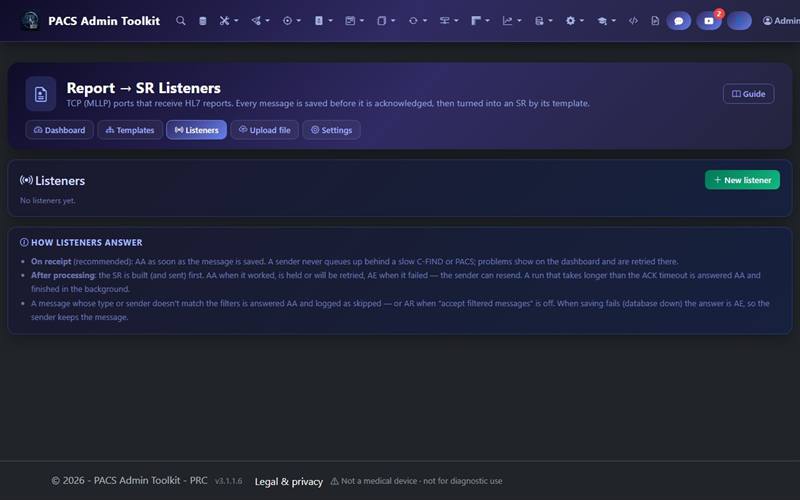
With PATK. A listener acknowledges each report on receipt; a C-FIND on accession and patient ID finds the study, and reports for exams not yet in the PACS are held and found on a later retry.
Outcome. The report sits with the images in the PACS, and the late-exam cases resolve themselves instead of becoming a reconciliation list.
A long-term report archive for a multi-site group
Challenge. A multi-site radiology group needs its reports kept as DICOM independently of any one PACS, so they can be fetched back after a PACS change or for outside sites.
With PATK. Report to SR turns the RIS feed into Basic Text SR and sends it to a PATK instance rebranded as the group's Report Archive, whose DICOM storage and routing keep the SRs and serve them to other PACS on request.
Outcome. Reports outlive the PACS that first displayed them, and a new PACS or an outside site can retrieve them like any other DICOM study.
Back-loading historic reports after a migration
Challenge. An imaging group moved PACS; ten years of reports exist only as an Excel export with MRN, accession, report text and a Study UID column that is often blank.
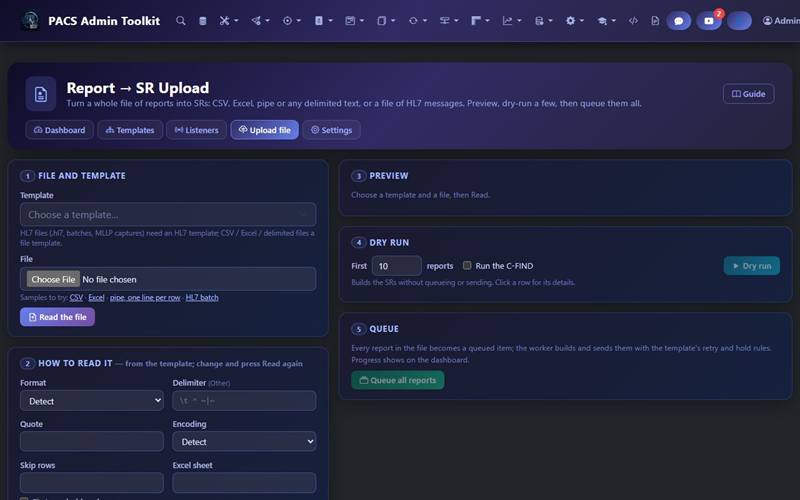
With PATK. The spreadsheet template maps the columns, C-FIND fills missing UIDs, a dry run of 20 rows is checked, then the whole file is queued with a duplicate key so a second upload replaces rather than duplicates.
Outcome. The historic archive gets its reports back without a paid conversion project, with every row's result on the dashboard.
Trust · Truth · Transform
Trust
Every report is saved before it is acknowledged; sample queries always include the patient ID; held reports wait rather than land in a new study, and only failed destinations are retried.
Truth
The dashboard shows every report as built, sent, held, retrying, failed or skipped, with its source, log, SR and send results.
Transform
Report back-loads and live report feeds become a template and a listener, set up and tested in the browser.
Value model
An example hospital network converting its live RIS feed and back-loading historic reports.
| Assumption | Example value |
|---|---|
| Reports converted per year (live feed) | 60,000 |
| Lookups in a separate report system avoided per year | 15,000 at 1 minute each |
| Reports needing manual study matching without C-FIND and hold-and-retry | 1% (600) at 10 minutes each |
| Blended staff cost per hour | $60 |
| Avoided report conversion service for 300,000 historic reports ($0.10 each), spread over 3 years | $10,000 per year |
| Estimated yearly value | $31,000 |
Illustrative only: every assumption is shown so you can replace it with your own numbers. Your results will differ.
Why it stands out
- Built for messy reports. Line-break detection, heading recovery and paragraph joining handle real exports that simple converters flatten into one line.
- Safe matching. Patient-ID-anchored C-FIND and hold-and-retry avoid the orphan studies a generate-a-UID converter creates.
- Self-service back-loads. A test bench, dry run and dashboard replace a one-off conversion service.
- Same platform. Listeners, destinations and audit live alongside routing and migration tools.
At a glance
| Standards | DICOM Basic Text SR (1.2.840.10008.5.1.4.1.1.88.11), C-FIND, C-STORE, C-ECHO; HL7 v2 ORU over MLLP with ACK |
|---|---|
| Inputs | MLLP listeners (filter by MSH-9 and MSH-3), HL7 message files, CSV, Excel, pipe or delimited text |
| Controls | Field templates and transforms, conditions, duplicate key, Study UID policy, error rules per problem |
| Tools | Test bench with DICOM dump, file preview and dry run, dashboard actions (give UID, correct, retry, resend) |
| Housekeeping | Retention per outcome (held and waiting reports never removed), SR output folder, worker pause |
Screenshots
More in Reports & Results
DICOM to HL7
Images and reports arriving as DICOM become the HL7 messages your RIS and EHR expect.
SR Measurements to HL7
Ultrasound, echo and DEXA measurements flow into results, PowerScribe and PDFs, not retyped.
SR Sync
Find the structured reports that never arrived, and move them where they belong, on a timetable.
PDF to Secondary Capture
Encapsulated PDFs in, viewable DICOM images out, sent on to the PACS without a click.
Study Sharing
Share stored studies with patients, referring doctors and sites, and record every look.
Not a medical device. PACS Admin Toolkit is not FDA-cleared or CE-marked and is not intended for primary diagnosis. It manages imaging and reporting data and workflows around the clinical systems that do.
Other product and company names may be trademarks of their respective owners. Screenshots show sample data. Value models are illustrative estimates, not guarantees.