 3T Consults and Coaching
PDF to Secondary Capture
Encapsulated PDFs in, viewable DICOM images out, sent on to the PACS without a click.
A DICOM listener that receives Encapsulated PDF documents, turns every page into a Secondary Capture image with the study's own identifiers, and sends the result to your PACS. Duplicate detection, reprocessing and a permanent record of every conversion come built in.
The challenge
Dose reports, cardiology and vascular worksheets, outside reports and scanned forms increasingly arrive as Encapsulated PDF objects. Many PACS, viewers and downstream archives either don't show them or bury them where radiologists never look, so the document is technically "in the study" but not seen.
The usual workaround is a person: open the PDF, print it, scan it back in as an image and attach it to the right study. It costs minutes per document, and every manual attach is a chance to put a page on the wrong patient.
What it does
A listener for PDFs
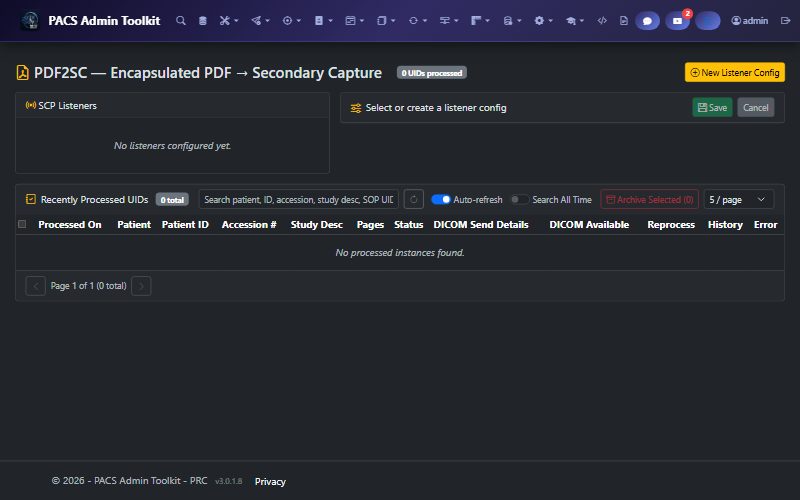
One or more DICOM listeners, each with its own AE title and port, accept Encapsulated PDF C-STOREs; other object types are ignored.
Answers at once
The sender gets Success immediately and conversion runs in the background, so modalities and other systems never wait on rendering.
Every page an image
Each page is rendered (150 DPI by default) into a Secondary Capture image, with adjustable resolution, JPEG quality and brightness.
Identifiers carried over
The output field mapping copies patient, study and order fields from the source object by default, and any field can be set from a value or template, previewed against a real DICOM file.
Sent on automatically
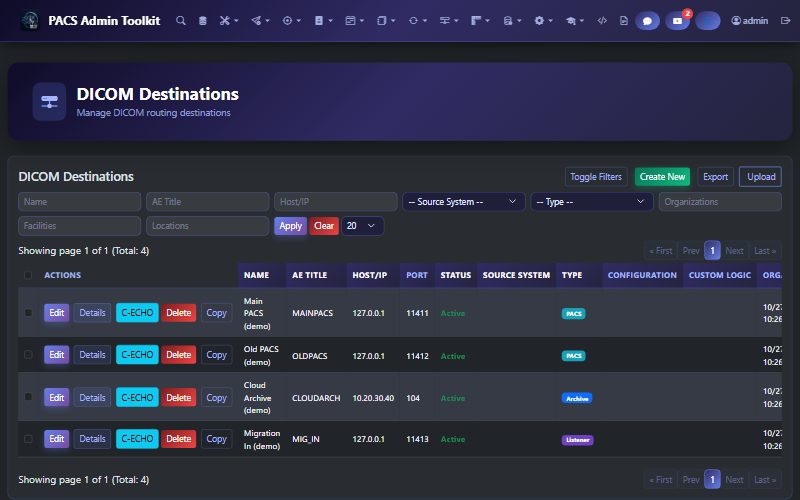
Converted images go to one or more DICOM destinations, either to all of them or to the first that succeeds, through the DICOM queue: each send retries on its own and can be watched, paused, retried or corrected there.
Duplicates handled
A re-sent instance within a window you set is marked Duplicate instead of being converted and sent again; "last in wins" keeps a corrected re-send on disk.
Reprocess when needed
With storage switched on, the received PDF is kept on tiered storage paths with its own retention, and Reprocess runs it through conversion and send again.
A record of every document
Recently Processed shows each document with patient, accession, pages, status and the result for every destination, searchable across all time and kept permanently.
How it works
- PDF arrives. A modality, reporting system or gateway sends an Encapsulated PDF to the listener.
- Acknowledged. PATK answers Success at once and, if storage is set up, keeps the received object.
- Pages rendered. Each page becomes a Secondary Capture image with the mapped identifiers.
- Sent on. The images are queued for the auto-send destinations and C-STOREd with automatic retries.
- Recorded. The document, its pages and each destination's result are logged for review and reprocessing.
Use cases
A multi-site radiology group with a dedicated conversion server
Challenge. Several systems in the group produce Encapsulated PDF objects, but some of its PACS and viewers cannot display them, so the documents were effectively invisible.
With PATK. The group runs a PATK instance dedicated to this one job, rebranded under Config so staff see it as the conversion server; senders route Encapsulated PDFs to it and it sends Secondary Capture pages to each PACS.
Outcome. Every system shows the documents in the more universally accepted Secondary Capture format, with no change to the senders or the PACS.
Cardiology and vascular worksheets in a hospital network
Challenge. Ultrasound and cardiology systems export worksheets as PDFs; staff print and scan around 40 a day so they show up in the PACS.
With PATK. The systems send their PDFs to the listener; conversion and send are automatic, and the processed list shows each worksheet, its pages and where it was delivered.
Outcome. Print-and-scan disappears from the workflow, and every worksheet keeps the identifiers of the study it came from.
Re-sends after a corrected document
Challenge. An upstream system re-sends the same document several times, and once with a correction, creating duplicate pages in the PACS.
With PATK. Duplicate detection skips repeat sends within the window; "last in wins" keeps the corrected copy, and Reprocess sends it when the team decides.
Outcome. One set of pages per document in the PACS, and the corrected version delivered on purpose, not by accident.
Trust · Truth · Transform
Trust
Identifiers come from the source object, not from someone typing; listeners have association limits and timeouts, and duplicates are caught before they reach the PACS.
Truth
Every document, its page count, status and delivery to each destination is recorded permanently and searchable, with a live listener log for troubleshooting.
Transform
Documents that needed a person to print, scan and attach now flow into the study in seconds, with no one touching them.
Value model
An example department that today prints and scans PDF documents, or pays for a separate conversion gateway.
| Assumption | Example value |
|---|---|
| Encapsulated PDF documents received per year | 12,000 |
| Documents that would otherwise be printed, scanned and attached by hand | 50% (6,000) |
| Staff time saved per document | 4 minutes (400 hours a year) |
| Blended staff cost per hour | $40 |
| Separate conversion gateway subscription avoided per year | $6,000 |
| Estimated yearly value | $22,000 |
Illustrative only: every assumption is shown so you can replace it with your own numbers. Your results will differ.
Why it stands out
- More than a converter. Duplicate detection, field mapping with preview, reprocessing and a permanent record are part of the listener, where a simple conversion utility only renders pages.
- No waiting at the sender. Success is returned before rendering starts, so a busy modality or gateway is never slowed by large documents.
- Same routing as everything else. It uses PATK's DICOM destinations, so the PACS connections are configured and monitored in one place.
- Storage under control. Received PDFs are kept only if you choose, on tiered paths with high-water marks and their own retention.
At a glance
| Standards | DICOM Encapsulated PDF Storage in, Secondary Capture Image Storage out, C-STORE, C-ECHO |
|---|---|
| Listeners | One or many, AE title and port each, calling AE, association limits and timeouts |
| Conversion | Per page, DPI, JPEG quality, brightness, series description and number, field mapping with preview |
| Delivery | Auto-send through the DICOM queue to all destinations or first success, per-destination results linked to their queue batch, Reprocess after a failed send |
| Resilience | Received PDFs staged on disk before conversion and picked up again after a restart |
| Housekeeping | Duplicate window, last in wins, tiered storage with retention, job retention, reprocess and archive |
Screenshots
More in Reports & Results
DICOM to HL7
Images and reports arriving as DICOM become the HL7 messages your RIS and EHR expect.
SR Measurements to HL7
Ultrasound, echo and DEXA measurements flow into results, PowerScribe and PDFs, not retyped.
Report to SR
Put the report in the PACS beside its images, from HL7 feeds or historic report files.
SR Sync
Find the structured reports that never arrived, and move them where they belong, on a timetable.
Study Sharing
Share stored studies with patients, referring doctors and sites, and record every look.
Not a medical device. PACS Admin Toolkit is not FDA-cleared or CE-marked and is not intended for primary diagnosis. It manages imaging and reporting data and workflows around the clinical systems that do.
Other product and company names may be trademarks of their respective owners. Screenshots show sample data. Value models are illustrative estimates, not guarantees.