 3T Consults and Coaching
DICOM Routing
Receive, fix and forward every image, with nothing lost when a destination goes down.
DICOM listeners that receive from modalities and archives, correct tags on the way through and route each image by rule. Store and forward or pass-through, with a retrying queue and a forward log that proves where every study went.
The challenge
Images rarely go straight from the scanner to the right archive with the right tags. A new modality sends the institution name in lower case, an acquired site uses its own patient ID domain, and the PACS rejects or misfiles what it does not like. Someone fixes it by hand, one study at a time.
When a destination is down, the questions start: which studies were sent, which were not, and which are still sitting somewhere waiting? With an opaque router, nobody can answer without an afternoon in log files.
What it does
Listeners for every sender
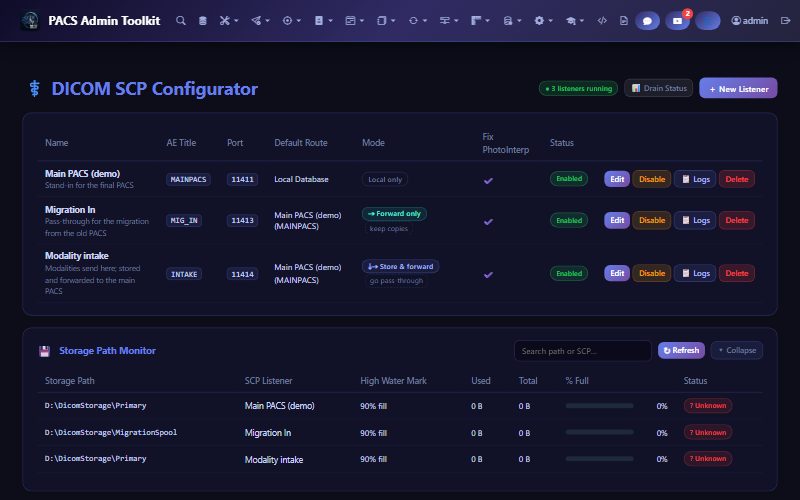
An AE title on a port receives C-STORE from modalities, PACS and migration sources, with per-listener SOP class and transfer syntax control and connection limits.
Three forward modes
Keep a local copy only, store and forward in the background, or pass straight through with no second copy; switch with one click and no restart.
Rules that pick the route
Conditions on called AE, calling AE, sender IP or any tag decide to forward, store only, discard or reject; a route tester shows where an image would go before anything is sent.
Tag fixes on the way through
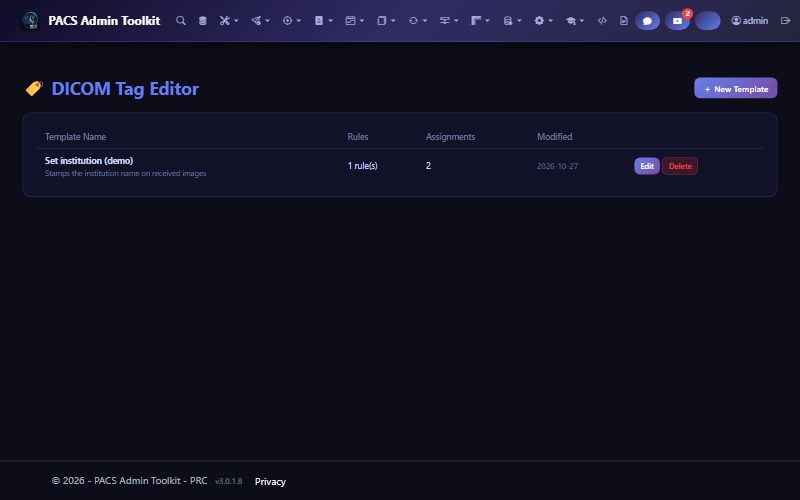
Tag Editor templates set, prefix, map, look up, shift dates and generate consistent new UIDs or accession numbers, on the listener or on each destination. With De-identification, a rule gives Patient ID the same crosswalk surrogate as the HL7 order, and refuses the image rather than send it with real or cut values.
Many sites, one port
One listener answers to many called AE titles, each with its own allowed senders and its own templates.
Built for bursts
Images for the same destination share a few connections instead of one connection each, and a duplicate already delivered to a destination in the last few minutes is not sent there again. Each destination tunes itself from real traffic: many images per connection or one, and more connections while throughput rises or fewer when the receiving system pushes back, up to a limit you set. A connection test using echoes only (never test images) shows how many connections a system accepts, and any destination can be fixed to manual settings.
Nothing dropped when a destination fails
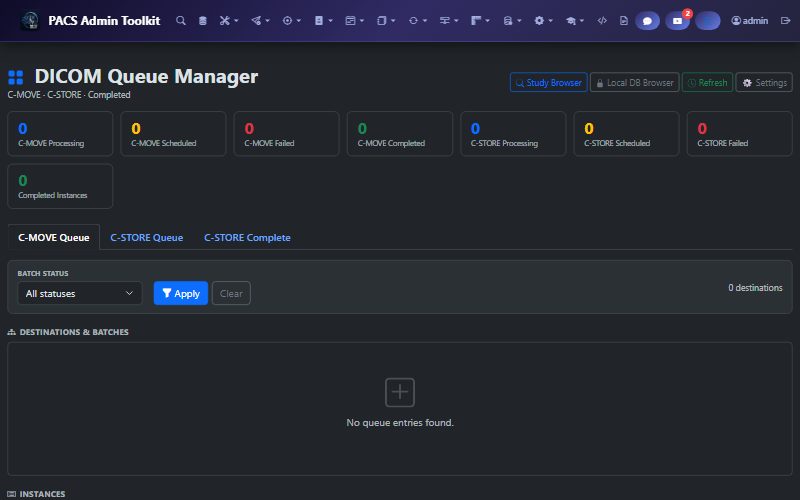
Store and forward retries with back-off and hands off to the DICOM queue; pass-through spools the image and queues it, and the queue survives restarts.
See every connection, catch the stuck ones
A live view lists every association the server has open to another DICOM system, from any feature, and flags any that are slow or have stopped answering; a searchable history keeps every ended association, with its outcome and accession numbers, for as long as you choose. The queue guards itself against endless loops: bounded retries, a time limit on every association, and no automatic forward of an image that two systems keep passing back and forth.
Fix a rejected image and send it again
When a receiver refuses the image itself, correct its tags from the queue with a Tag Editor template or quick changes, preview every change, and resend an edited copy. The original is kept as it was.
Rules checked against live traffic
Worth a look findings show routing rules that never match, a rising share of images no rule matched and listeners gone quiet; a draft rule is tried on the last 7 days of unmatched images before it is saved, and alerts fire when traffic leaves its usual weekly pattern.
A forward log you can search
Every forwarded study, per destination, delivered or not, with the last association's details, searchable by patient ID, accession or UID.
Duplicates handled safely
When a sender resends an image that is already stored, the first copy is kept and nothing in the stored study changes. A duplicate log shows each one with the reason, such as a plain resend or the same image under a different patient or exam, and what differed, so corrected resends are easy to spot. Each listener can also have trust rules that name which senders may replace a stored image (by calling AE, called AE, address range, tags or what changed), with safeguards such as never replacing with a lossy or smaller copy. Optional hard rules on a listener or a storage location set limits no rule can loosen. When a trusted copy replaces a stored image, the previous copy is kept for a set number of days and can be put back with one click; a resend that is the same image changes nothing, and identical copies are kept once. Rules can also hold a duplicate for review, with a side-by-side comparison and one-click or bulk decisions, or refuse it with the reply each sending system can handle, learned per sender. One shared set of rules can govern several listeners and is edited once for all of them, and uploads and store re-index scans can follow the same rules. Quick brakes pause duplicate handling for one listener or all of them, and automatic limits stop a flood of resends from filling disks or queues while normal images keep flowing. A Try panel shows what the rules would do with a stored image before anything changes, and rules can first run in a record-only mode.
Storage that looks after itself
Several storage paths with high-water marks, automatic overflow, e-mail alerts, and Storage Moves to rebalance or retire a drive while the listeners keep running.
Queries shaped per system
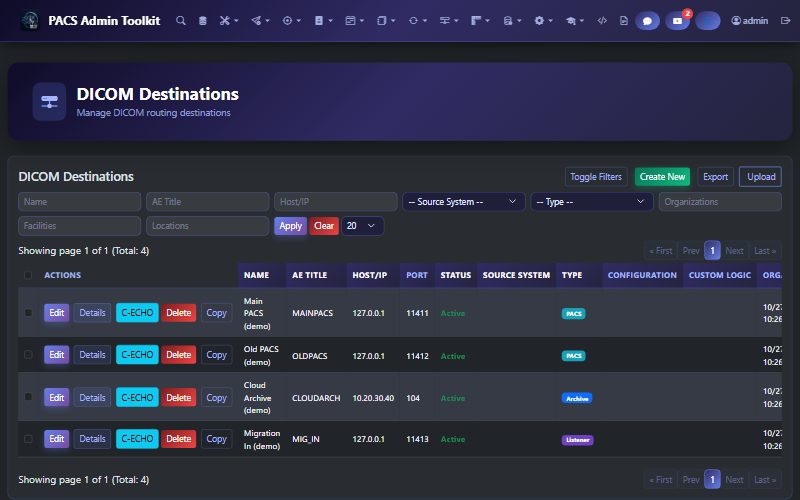
A destination can carry default search rules, such as stripping a Patient ID prefix it does not store, used by every prefetch, fetch, study browser and priors query sent to it. Moves always use the identifiers the search found.
A tidy list of destinations
When several destinations share one AE title, one is marked as the one used whenever only the AE title is known, such as a move request from another system. True duplicates can be folded together with every workflow, rule and queue item moved to the one kept, after an exact preview. A usage view shows what uses each destination, so a list imported from another server can be trimmed to the ones really needed. Destinations still in use can't be deleted by accident.
A small archive too
Store-and-forward listeners answer C-FIND and C-MOVE for what they hold, limited per facility or site when Access Topology is licensed.
How it works
- Image arrives. A sender calls the listener's AE title; the port, called AE and allowed senders decide whether it is accepted.
- Tags fixed. Photometric correction, then Tag Editor templates, then any migration tag changes.
- Route chosen. Routing rules run top to bottom; images no rule picks up go to the default destinations.
- Stored and sent. The image is kept, forwarded or both, with outbound templates applied per destination.
- Failures recovered. Retries, spooling and the DICOM queue deliver it later; the forward log records the result.
Use cases
Imaging centre with a fussy PACS
Challenge. A new CT sends the institution name in lower case and leaves the station name blank; the PACS team fixes studies by hand every week.
With PATK. A pass-through listener applies a two-rule template and forwards to the PACS, with spooling on in case the PACS is unavailable.
Outcome. Every study arrives correctly tagged, with no second copy on disk and no weekly clean-up.
Hospital network absorbing an acquired site
Challenge. The new site's modalities use their own MRNs and AE titles, and its studies must reach the network PACS without colliding with existing patients.
With PATK. One listener answers to each site's AE titles; a template fills the Issuer of Patient ID from a lookup table keyed on the calling AE; 300 modalities load from a spreadsheet.
Outcome. The site sends to one address from day one, and every study reaches the PACS with its patient ID domain intact.
PACS outage during a busy evening
Challenge. The reading PACS goes down for three hours while emergency department scanners keep sending.
With PATK. Listeners keep accepting; images are stored or spooled and queued. When the PACS returns, one click reprocesses the failed batches and the forward log confirms delivery study by study.
Outcome. Scanners never stop, and the after-action report is a filtered list, not a guess.
Migration listener for a PACS replacement
Challenge. Millions of studies must move to a new PACS with an issuer added to every patient ID.
With PATK. A store-and-forward pilot proves the tag changes on 25 studies; the listener then switches to pass-through for the bulk, keeping disk use flat.
Outcome. The same router that handles daily traffic carries the migration, with every send logged.
Trust · Truth · Transform
Trust
Senders are admitted by AE title and host; unsafe pixel data is refused; failed sends are spooled and retried across restarts; tag changes can be recorded in the Original Attributes Sequence.
Truth
The forward log, queue status, drain status and storage monitor show where every study is and why a send failed, down to the association.
Transform
Tag fixes, site onboarding and outage recovery become configuration changes in a browser instead of manual rework and vendor tickets.
Value model
An example multi-modality department replacing a stand-alone router and the manual work around it.
| Assumption | Example value |
|---|---|
| Stand-alone router licence and support avoided per year | $25,000 |
| "Where is my study?" investigations per year | 240 |
| Time saved per investigation with the forward log (30 to 10 minutes) | 20 minutes |
| Studies a year that would otherwise need manual tag correction | 1,000 |
| Time to correct one study by hand | 5 minutes |
| Blended PACS staff cost per hour | $55 |
| Estimated yearly value | $34,000 |
Illustrative only: every assumption is shown so you can replace it with your own numbers. Your results will differ.
Why it stands out
- Provable delivery. A per-study, per-destination forward log answers "did it arrive?" in seconds, which many stand-alone routers leave to raw log files.
- Test before live traffic. Template tests, the route tester and evaluate-only test runs show the result without sending anything.
- One platform. Routing shares destinations, queues, audit and login with prefetch, worklist, migration and reporting tools.
- Built for outages. Spooling, back-off and a restart-proof queue are standard, not extra-cost options.
At a glance
| Standards | DICOM C-STORE, C-ECHO, C-FIND and C-MOVE (SCP and SCU) |
|---|---|
| Modes | Local only, store and forward, forward only (pass-through) with spooling |
| Routing | Called / calling AE, sender IP and tag conditions; forward, store only, discard, reject |
| Tag editing | Templates on listeners and destinations, lookup tables, UID and number generators, sequence paths |
| Monitoring | Forward log, DICOM queues with accession numbers, live outbound sessions with stall flags and searchable history, storage path monitor with e-mail alerts, drain status |
Screenshots
More in Imaging & Routing
DICOM Tools
Find, move, import, test and tidy studies from one browser, without a ticket to the PACS vendor.
Priors Fetch
One click from the reading worklist to every prior, fetched to every place it is needed.
Prefetching & HL7 Fetching
The order arrives, and the right studies are already on their way to where they are needed.
Auto Forward Rules
Send each study to the right reader at the right time, without a second router.
Not a medical device. PACS Admin Toolkit is not FDA-cleared or CE-marked and is not intended for primary diagnosis. It manages imaging and reporting data and workflows around the clinical systems that do.
Other product and company names may be trademarks of their respective owners. Screenshots show sample data. Value models are illustrative estimates, not guarantees.