 3T Consults and Coaching
Local Bulk Updater
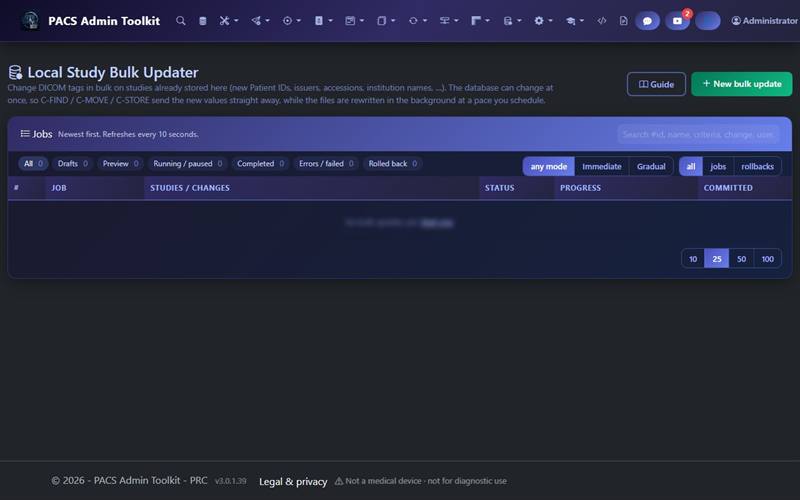
Correct patient IDs, issuers and institution names on stored studies, previewed, paced and reversible.
Changes DICOM tags in bulk on studies already stored in PATK, the way a migration would but without moving anything. Every change is previewed study by study, files are backed up and checked as they are rewritten, and a job can be rolled back.
The challenge
After a merger, a site rename or a change of MRN system, thousands of stored studies carry the wrong Issuer of Patient ID, the old institution name or an accession format the rest of the enterprise no longer recognises. Each one is a study that can be missed in a prior search or matched to the wrong patient.
Fixing them one at a time is not realistic, and the usual alternatives are worse: send everything out and back through a tag-changing route, or pay a data correction service by the study and hope nothing in the archive was damaged.
What it does
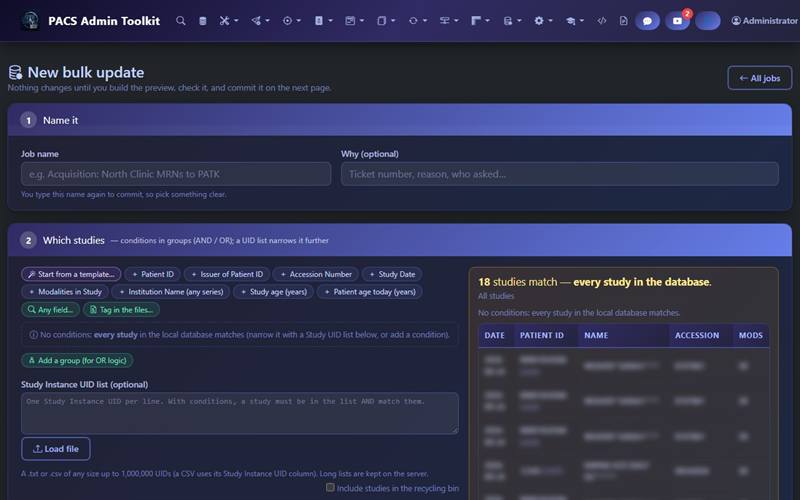
Pick exactly the studies
Conditions on patient, study, series and calculated fields (study age, days since received) in AND / OR groups, any tag read from the files, and Study UID lists of up to a million entries.
Rules for every kind of fix
Set a value built from fields, clear, find and replace with regular expressions, add a prefix or suffix (safe to run twice), copy from another field, or look up old-to-new values from a CSV.
Patient identity handled
A new Patient ID or issuer moves the study to the right patient, and IDs already used by someone with a different name, birth date or sex are flagged or merged on purpose.
A preview you sign off
Every matched study is listed as To change, Problem, Already current or Left out, with each tag's old and new value; what you checked is exactly what is written.
Immediate or gradual
Immediate changes the database at commit and a send-time change table keeps C-FIND, C-MOVE and exports agreeing while files are rewritten; Gradual changes each study with its files.
Paced file rewrites
Run windows, threads, images per minute and CPU / RAM ceilings, with an off-peak preset; every file is backed up, rewritten, read back and checked before it is swapped in.
New images and re-sends follow
Images that arrive for a changed study during the job and for a set number of days after it get the new values, and finished studies can be re-sent to chosen destinations.
Locked, audited and reversible
Studies in a job are locked against other edits, every step is audited, Export CSV lists every old and new value, and rollback restores files from backups.
How it works
- Match. Conditions and / or a Study UID list pick the studies.
- Rules. Set, clear, replace, add, copy or look up new values per tag.
- Preview. Every study's old and new values, with problems flagged.
- Commit. Type the job name; the studies are locked.
- Rewrite and check. Database rows change, then files are backed up, rewritten and verified at your pace.
Use cases
Re-identifying an acquired clinic's studies
Challenge. A clinic's studies arrived with issuer NORTH and its own MRNs; they must carry the enterprise MRN and issuer, with the old MRN kept.
With PATK. One job copies Patient ID to Other Patient IDs, swaps Patient ID from the merge file's lookup table (no row means a flagged problem) and sets the new issuer, in Immediate mode with off-peak file rewrites.
Outcome. C-FIND shows the new MRNs at once, sends carry them while files are rewritten overnight, and every study that needed a decision was caught in the preview.
Institution renamed after a merger
Challenge. Every series from OLD MEMORIAL must show the hospital's new name, but nothing about it is urgent.
With PATK. A find-and-replace rule on Institution Name runs in Gradual mode with two threads, any time of day.
Outcome. The archive reflects the new name without a maintenance window or a re-migration.
Accession prefix to keep sites apart
Challenge. Two sites issue overlapping accession numbers, and the enterprise has agreed to prefix one site's accessions.
With PATK. A job adds "S-" in front of the southern site's accessions, skipping values that already have it, and re-sends changed studies to the downstream system that needs them.
Outcome. Accessions are unique across sites, and running the job again changes nothing.
Trust · Truth · Transform
Trust
A preview, a typed confirmation and a specific permission are required; originals are backed up, every file is read back before it replaces the original, UIDs and pixel data can never be changed, and a job stays within the facilities and sites its user can see.
Truth
See every study's exact old and new values before commit, live database and file progress after it, and a CSV of every change for the record.
Transform
A clean-up that once meant a re-migration or an outside service becomes a job you set up in an hour and leave to run off-peak.
Value model
An example organisation correcting identifiers after one acquisition plus routine fixes through the year.
| Assumption | Example value |
|---|---|
| Studies corrected per year (one acquisition re-ID plus smaller fixes) | 60,000 |
| Per-study fee of a data correction service, avoided | $0.40 ($24,000) |
| Small ad hoc corrections per year otherwise done study by study | 200 |
| Administrator time saved per small correction | 15 minutes (50 hours a year) |
| Blended staff cost per hour | $55 ($2,750) |
| Estimated yearly value | $26,750 |
Illustrative only: every assumption is shown so you can replace it with your own numbers. Your results will differ.
Why it stands out
- Fixes in place. Nothing is moved, so there is no second copy, no re-migration and no load on another system, unlike sending studies out and back through a tag-changing route.
- Safe by design. Frozen previews, locks, backups, read-back checks and rollback are part of every job, where scripts and hand edits offer none of them.
- Systems stay in agreement. The send-time change table and new-image window keep queries, sends and late images consistent while files are rewritten.
- Paced for production. Run windows, rate caps and CPU / RAM ceilings let a million-study job run alongside daily work.
At a glance
| Selection | Database conditions, tags read from files, AND / OR groups, Study UID lists up to 1,000,000 |
|---|---|
| Rules | Set, clear, find and replace (regex), add in front / at end, copy from field, lookup table |
| Modes | Immediate (with send-time change table) or Gradual |
| Pacing | Run windows, threads, images per minute, CPU / RAM ceilings, off-peak preset |
| Safety | Preview, typed confirmation, permissions, study locks, backups, read-back checks, rollback, audit, CSV export |
| Not changed | UIDs, pixel and per-image tags, sequences, private tags, copies already sent elsewhere |
Screenshots
More in Data Lifecycle
PACS Migration
Move every study from the old PACS to the new one, fix tags on the way, and prove it arrived.
Study Retention Policies
Keep what the law and your records officer require, release the rest, and prove it.
Not a medical device. PACS Admin Toolkit is not FDA-cleared or CE-marked and is not intended for primary diagnosis. It manages imaging and reporting data and workflows around the clinical systems that do.
Other product and company names may be trademarks of their respective owners. Screenshots show sample data. Value models are illustrative estimates, not guarantees.