 3T Consults and Coaching
Tele-RIS
Orders with accession numbers you can trust, each site's exams mapped to one catalog, patients built from what you already hold, and the doctors on every order.
An add-on for tele-radiology groups that builds patients, orders, providers, procedures, reports and distribution on top of PATK's HL7, DICOM, worklist and patient-index tools. So far it holds orders, each with an Assigned Accession Number made by a scheme you design per site, arriving by HL7, FHIR, API or DICOM and checked against what a full record needs at that site, with the missing values suggested, scanned and uploaded documents (cards, requisitions, consents, prior reports) read by OCR, sorted and searchable, whose values a person accepts into the chart, order or insurance, reports typed and signed here or received from reading systems, with one preliminary, one final and numbered addenda per order and every change held for review, critical findings with a call log and overdue alerts, a results portal where patients, referring providers and sites see their reports and images and where staff share exams by link with every look recorded, report distribution by HL7, e-mail, fax, print or folder with rules, retries and a resend queue, a procedure catalog that maps every site's own exam names to shared procedure sets with CPT codes, quality measures, reading pools and RVUs, patient charts with insurance, allergies and safety alerts, built from the patient index, stored studies, the worklist and HL7 instead of typed again, who you read for (accounts, facilities and sites with their opening hours, holidays, contacts and agreements), one record per referring doctor, radiologist and technologist with the names and codes they arrive under, and the shared ground every later part uses, namely diagnosis code sets with yearly editions, extra fields you name yourself, and a bulk importer with a dry run and undo.
The challenge
A tele-radiology group reads for many facilities, and each one sends orders its own way. Before a single order can be handled well, a lot of plain reference data has to be right: which group a hospital belongs to, when a site is staffed in its own time zone, which fax number takes reports, who to call at night, whether the business associate agreement is still in force, and which diagnosis codes applied last September.
That groundwork is usually spread across spreadsheets, custom columns nobody documented and import scripts written once and never trusted again. A contract lapses unnoticed. A code list updated in October quietly changes how September's orders look. A bad import is found a week later with no way back.
What it does
An accession number that never repeats
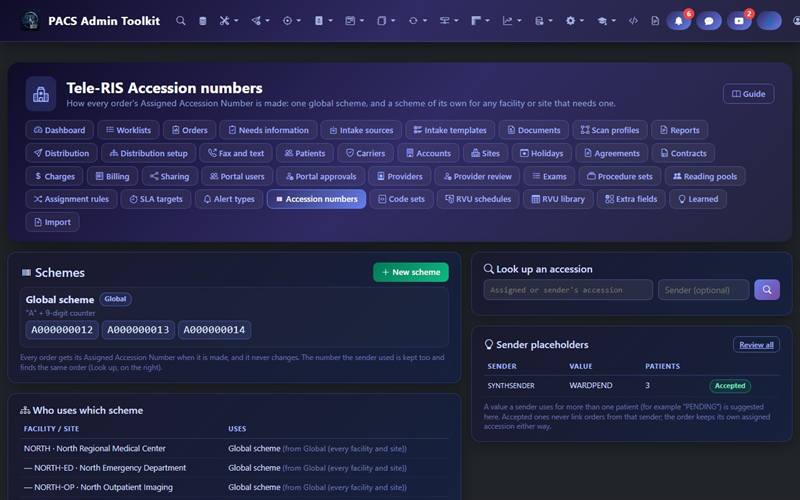
Every order gets its own Assigned Accession Number when it is made, from a scheme you build out of parts (prefix, site code, date, counter, random characters, check character) with a live preview, globally or per site. It fits the 16-character DICOM limit, never changes and is never given twice. The number the site sent is kept beside it and still finds the order, and placeholder values like 1, NA or the MRN are marked instead of trusted.
Every site's exams, one catalog
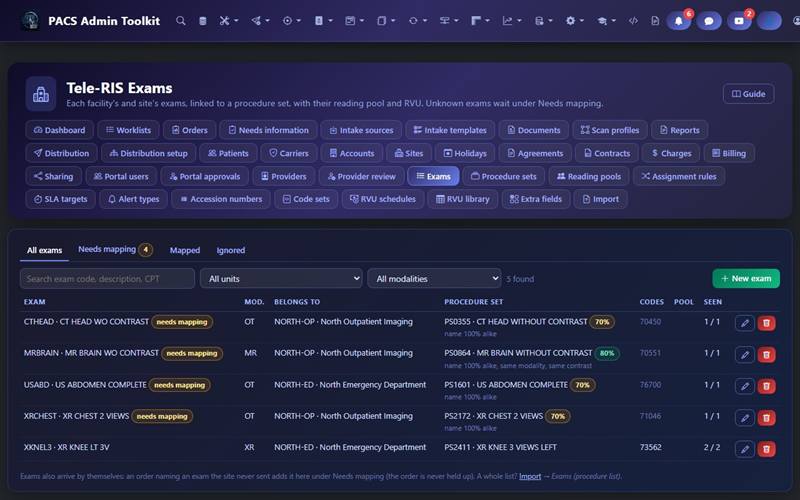
Shared procedure sets hold the CPT codes with modifiers and units, quality measures, two yes / no flags and the default reading pool; about 2,500 ship ready to load. Each site keeps its own exam codes and names, linked to a set, with its own pool or codes where it differs.
Unknown exams never hold an order up
An exam nobody has seen is added under Needs mapping with the closest set suggested (same codes, close name, modality, side, contrast) and a score that says why. Accept the right suggestions in bulk.
Reading pools on every exam
Pools such as MSK, NEURO or BODY carry the code outbound messages should use, and every order keeps the pool it was given.
RVUs on every order
The work RVU of the exam's codes from the CMS schedule in force on the exam date (professional, global or technical), or a fixed value with its reason, kept with the order.
Orders from every feed
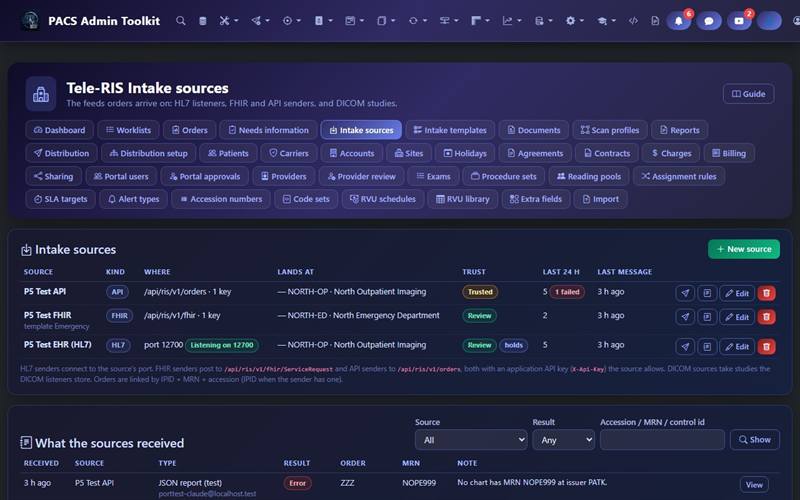
HL7 listeners (ORM, OMI, OMG, SIU), FHIR R4 ServiceRequests, a JSON API and the DICOM studies themselves. New orders, changes and cancels are understood, every message is logged with what came of it, and a site that sends no orders can have orders made from its studies.
Linked by IPID + MRN + accession
Orders, studies and reports find each other by the patient's ID with its issuer, where the sender has one, plus the accession. An MRN on charts of two issuers is refused instead of guessed.
A full record, defined per site
Intake templates say what each facility needs (birth date, insurance, authorisation, ordering provider, diagnosis code …), required or recommended, and only for some modalities, patient classes or feeds. Four ready-made templates ship.
Missing values suggested, with the reason
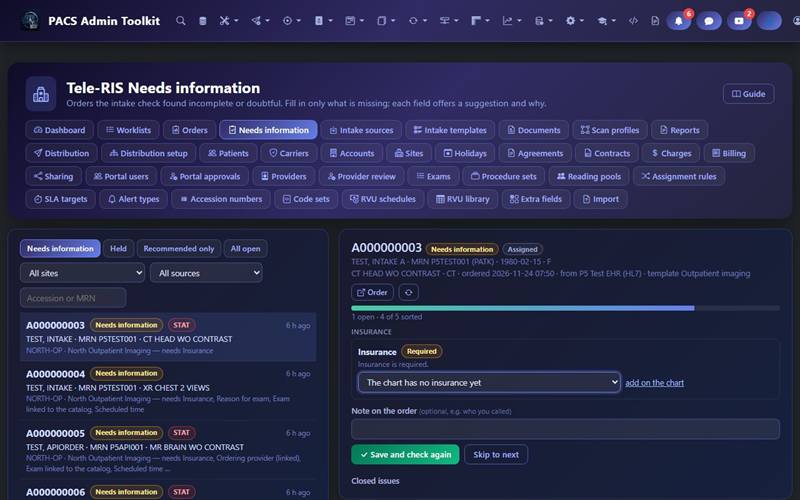
Incomplete orders wait in one Needs information queue that asks only for what is missing: the chart's primary insurance in force today, the provider used most for that exam at that site, the side in the exam's name. Names or birth dates that differ from the chart, a side that disagrees with the exam, and a likely duplicate are flagged for a person to check.
Trust set per feed
A feed under review never changes a chart; a trusted feed fills empty chart fields. A feed can hold incomplete orders until they are filled in, or let them go on flagged.
Every paper kept with its patient and order
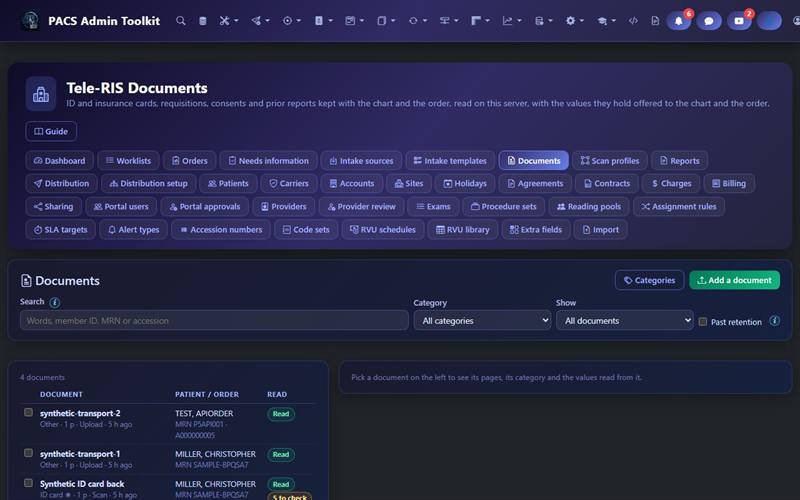
Upload or scan ID and insurance cards, requisitions, consents and prior reports straight from the browser. Each is read by OCR, sorted into a category and found again by any word on it, an MRN or an accession.
Sorting that learns
Key phrases put a document in its category; move one by hand and documents that look the same follow next time. A card-sized image counts towards the ID and insurance categories.
Cards read, not re-typed
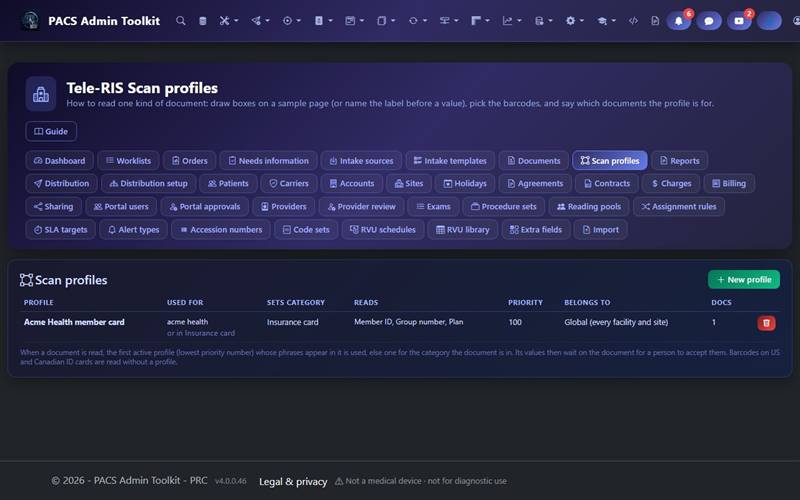
The barcode on US and Canadian driver's licences gives name, birth date, sex and ID number with no setup. A scan profile drawn once on a sample reads a payer's card or a referrer's form by boxes, labels or barcodes, and each value is checked against what it should look like.
A person accepts every value
Values found wait on the document. Accept puts each where it belongs: the chart, the order (with the same checks as Needs information) or the patient's insurance. Needs information also suggests values accepted from the patient's documents.
Requisitions next to the images
Send a document's pages as DICOM images into the order's study, through the same queue and retries as every other send.
One report per order, never overwritten
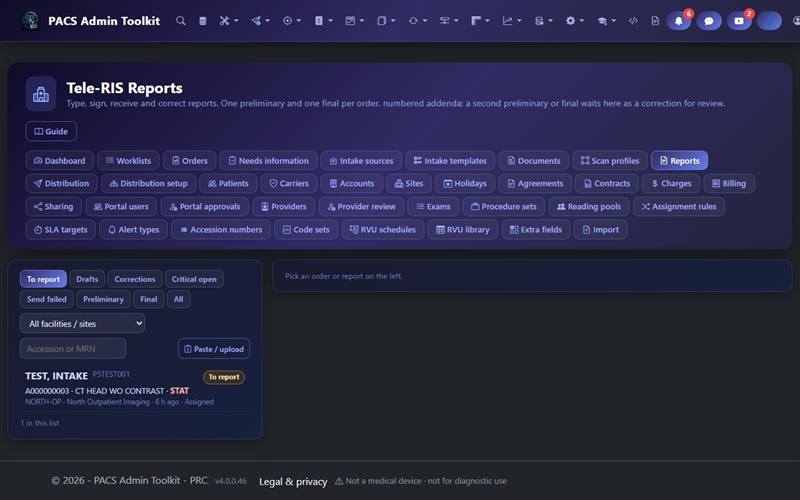
One preliminary, one final and numbered addenda per accession. A second preliminary or final, from a person or a feed, waits as a correction beside a line-by-line comparison until someone accepts or rejects it. Signed wording is never changed.
Reports from wherever they are read
Type and sign them here, or receive them by HL7 ORU or MDM, FHIR DiagnosticReport, a JSON API, or paste and upload one that came by fax. Each finds its order by IPID + MRN + accession, and what arrived is kept unchanged.
Critical findings that cannot slip
Each level has its time to tell someone. Every call is logged with who was reached and whether they read the finding back, and a finding past its time raises an alert.
Reports delivered and proven
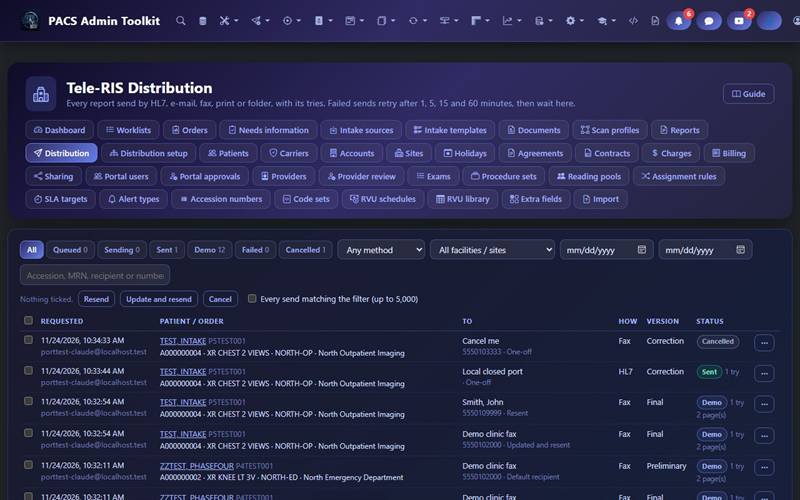
Rules send each signed version to the ordering or referring doctor, by their fax or e-mail at that site, or to standing recipients by HL7, e-mail, fax, print or folder. Failed sends are tried again, then wait in one queue with every try to correct and resend in bulk. Fax starts in a demo mode, so nothing leaves before you are ready. By e-mail, a rule can send a link to the report on the results portal instead of the PDF, so the report never sits in a mailbox, and mail with patient information is only sent over an encrypted connection unless you choose otherwise.
HL7 reports shaped to each hospital
Each HL7 template sends back the accession the hospital expects: its own from the order, the one on the images, or yours. Any field of the outgoing ORU can come from the RIS, be copied from the order message the hospital sent (a whole PV1 or ORC segment in one click), be fixed or blank, and be changed on the way out with date formats and value pairs. A preview marks every changed field.
Rules that know where a report came from
A rule can fire on reports signed here, on reports that arrived as HL7 ORU or MDM, by FHIR or by the API, or any mix, so a received transcription can be forwarded without echoing reports back to where they came from.
Incoming values fixed at the door
Every field read from an order or report feed can be read from a custom place and changed as it arrives, and extra fields fill straight from the feed. A check on a pasted or last-received message shows what each field gets.
Images where people read them
Staff open an order's study in the full image viewer or the report viewer in one click. Images held on another PACS are found by Study UID, accession or MRN and date, and copied here by staff, by portal users or automatically when an exam is shared. Portal users get a locked viewer with window and level, zoom, cine and side-by-side series, with images drawn on the server.
Cloud fax without a fax server
Send faxes through a cloud fax provider with your own account: each fax waits as confirming until the provider reports it delivered, failed ones are tried again, and a monthly page cap keeps the bill in check. Live faxing stays locked until the business associate agreement is recorded.
Codes by text
Portal users can get their one-time sign-in codes by text, and a share link can open with a code texted to the recipient. Texts carry codes only, never results, go only to a confirmed mobile and stay locked until the text carrier's business associate agreement is recorded; when texting is off the code goes by e-mail.
Suggestions you can see and correct
Column matches, value translations, document categories and a sender's placeholder accessions are learned from people's choices and shown on one page, where each can be kept, pinned, rejected or forgotten, with how often suggestions are kept month by month.
Figures without a report writer
Orders, final reports and turnaround, deliveries with fax pages, intake problems and portal use are counted day by day in Insights, per facility or site, with no patient values.
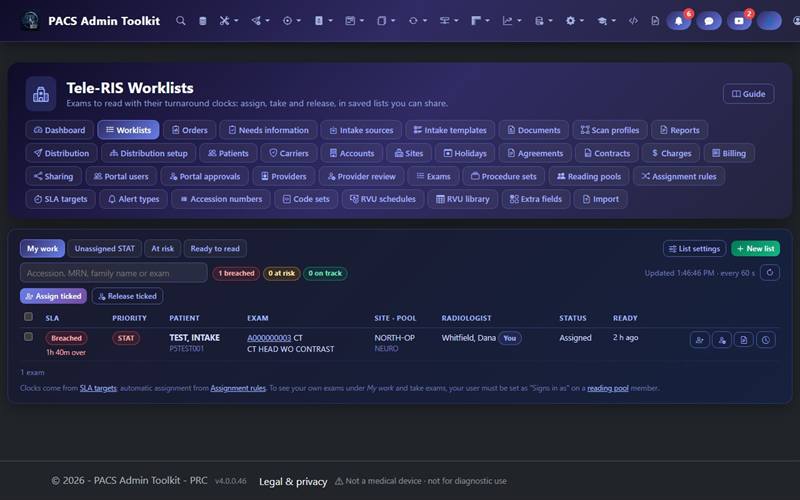
Worklists with a turnaround clock on every exam
Saved lists (my work, unassigned STAT, at risk, ready to read, or your own) show each exam's time to its preliminary and final as on track, at risk or breached. Share a list with roles, users or a reading pool.
Turnaround targets per account, in and after hours
SLA targets by priority, modality and patient class, per site, facility or for everyone, with shorter or longer times when the site is closed. Change a target and recalculate the open exams.
The right radiologist, automatically
Assignment rules give ready exams to pool members who hold a licence in the site's state, are privileged at the site and are on shift, least loaded or in turn, primaries before backups and never over their limit. A try panel shows who would get an exam and why the others would not.
Take, assign and release, all on the record
Radiologists take exams themselves; coordinators assign them, with every check shown, and release them with a reason. Every hand-over is kept in the exam's history.
Alerts that reach the right person
A notification bell on every page tells the radiologist when an exam is assigned and tells the people you choose when an exam is at risk or breached, an order is stuck, a critical finding is overdue, a send failed or a correction waits. Counts feed the Alert Center for e-mail and webhook alerts.
Contracts that price every read
Each client's contract covers its facilities and sites (and modalities) from a date. Its price schedules give per-read prices by CPT, modality and priority, or a rate per RVU, with STAT and after-hours uplifts and a minimum. Next year's prices start on their own date, so last year's reads keep last year's prices.
Charges captured when the final report is in
One line per billable code, priced from the contract in force on the exam date, with how the amount was worked out. A read that cannot be priced is held with the reason (no contract, no price, no CPT) instead of being billed wrong or not at all.
Fix, reprice, void, all on the record
Correct a held line's codes or price it by hand with a reason, price lines again after a price change, void a duplicate. Lines on a final invoice never change.
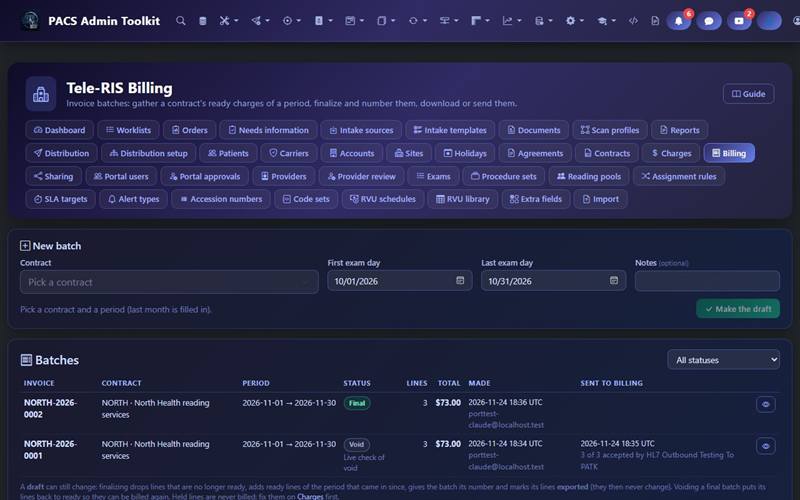
Invoices in a few clicks
A batch gathers a contract's ready lines for a period; finalizing numbers it per contract and year. Download it as CSV or a statement PDF with your letterhead and the client's billing address, or send it to a billing system as HL7 DFT^P03.
A results portal with no passwords to forget
Patients, referring providers and site staff sign in with their e-mail and a one-time code; patients also give their birth date. Patients see their finished reports, providers the exams they ordered, sites their own exams, each with a PDF copy.
Share an exam with a link, not a CD
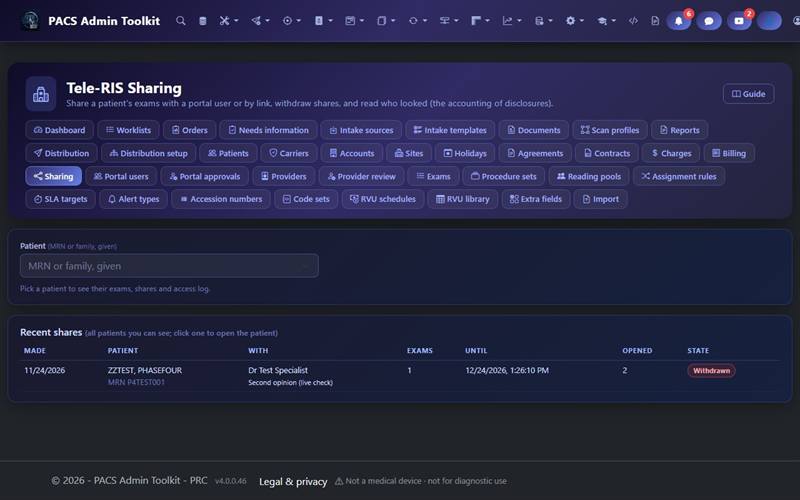
Pick the exams, choose report, images or download and an end date, and send a link that opens only with the patient's birth date or a code e-mailed to the recipient. Withdraw it at any time; five wrong answers lock it. Shares and portal invitations go only to active portal users and to addresses whose owner confirmed a one-time code; an unconfirmed address waits until its owner registers and is approved.
Every look on the record
Each sign-in, report, image, download and failed check is logged with who, when and from where, and the patient's accounting of disclosures downloads as CSV. Referring practices can pull the same exams into their own software with a personal API key.
Orders entered once, in the site's time
Patient, site, exam, priority, providers, ICD-10-CM diagnoses, codes, contrast, insurance and authorisation, with times typed and shown in the site's own time zone and a status history of who moved it, when and why.
A chart built from what you already hold
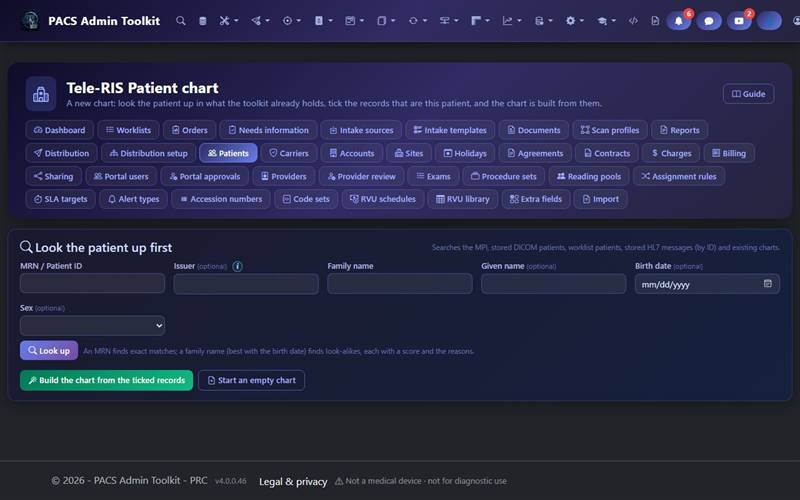
A new patient starts with a look-up across the patient index, stored studies, worklist patients, stored HL7 messages and existing charts. Each record found shows a score and why (same ID, same birth date, a name that sounds the same). Pick the right ones and the chart fills itself, every value labelled with its source and disagreements shown side by side.
One chart per patient per issuer
MRN and assigning authority are unique together, so the same number from two hospitals never collides, and the same person at two hospitals links to one patient-index person.
Insurance, allergies and safety alerts on the banner
Primary, secondary and tertiary insurance; allergies with contrast first; pregnancy, implants, isolation, kidney function with a value and date. HL7 allergy and insurance segments come across when a chart is built.
A carrier library
Payers once, with payer ID, plans and the other names they arrive under, so typed and imported insurance links to the right payer.
Accounts above facilities
A client group with its addresses, numbers and people; many facilities and sites belong to one account, on the same org tree that already scopes access.
A profile for every facility and site
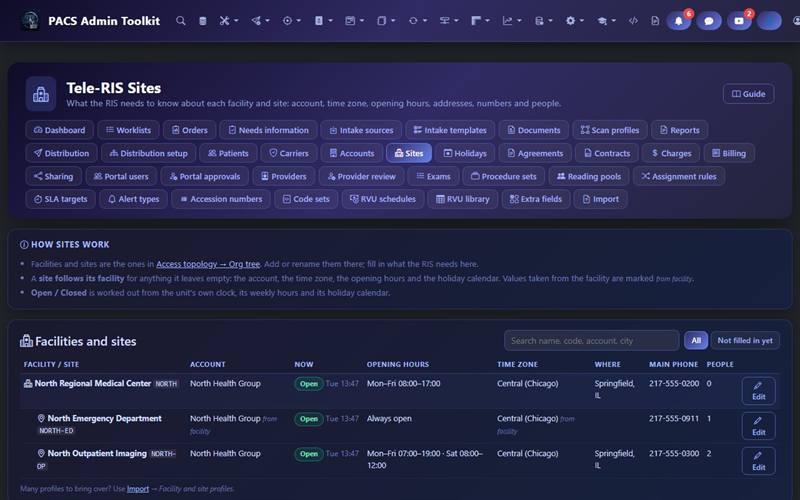
Account, legal name, registry numbers, time zone, opening hours and holiday calendar. A site follows its facility for whatever it leaves empty, and the page shows which values are inherited.
Open or closed, by the site's own clock
Worked out from the unit's time zone, weekly hours and holiday calendar. The United States federal holidays of a year are added to a calendar in one step.
One contact book
Addresses, phone, fax, e-mail and named people with roles are kept once and used by every later part, including where reports are faxed.
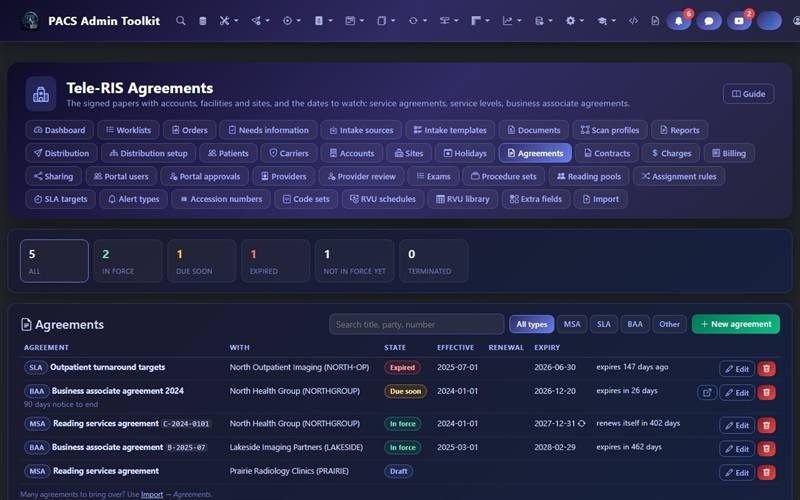
Agreements with dates that are watched
Service agreements, service levels and business associate agreements show as due soon inside their reminder period and as expired after it, with a link to the signed copy.
One record per doctor
Referring doctors, radiologists and technologists with NPI, specialty, the codes other systems give them, the sites they work at with the phone and fax there, licences with expiry dates and privileges per site. The public NPI registry fills in the details from the number.
Doctor names matched, then remembered
A name or code on an incoming order, study or import is linked by NPI, by code, by a name confirmed before, or by how alike the names are (spelling, sound, nicknames, where they work). What cannot be settled waits on one review page, busiest first, and each answer is remembered so the same spelling links by itself next time.
Duplicates found and folded
Records that sound alike and agree on their details are offered for a merge; the merged record keeps pointing at the one kept.
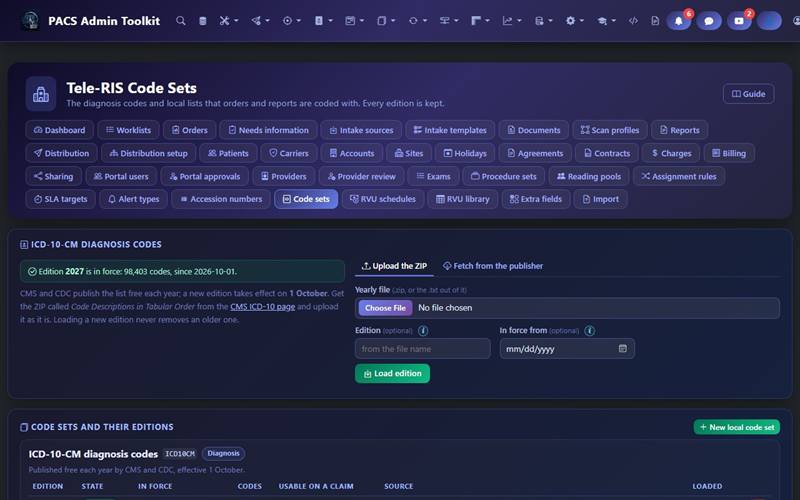
Diagnosis codes from the publisher's own file, every edition kept
Load the yearly ICD-10-CM file as published. A new year never replaces the old one, and a search for a record uses the edition in force on the record's date.
RVUs from the CMS relative value file, checked before they load
Upload the quarterly CMS zip as it is: the page picks the relative value file out of it, shows what changes against the schedule you have, and lists any row it could not read. Every schedule is kept, rows can be corrected by hand with a reason, and the whole schedule exports to CSV.
Your own code sets and extra fields
Local lists sit beside ICD-10-CM. Ten spare fields on every patient and ten on every order become real fields when you name them, each with a type and the HL7, DICOM, FHIR or API place its value comes from.
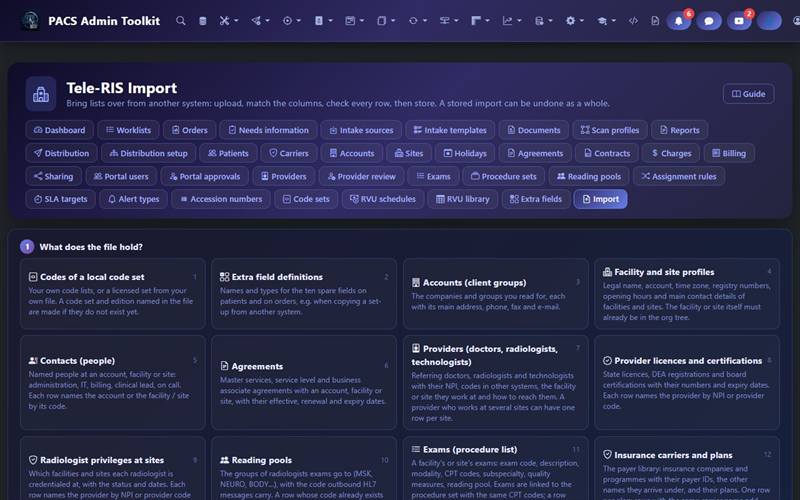
One importer for every kind of record
Upload a CSV or Excel file, match its columns, explain the file's own words once (A for Active), and check every row before anything is stored. Choices are remembered for the next file.
A dry run, then undo by import
See what would be added, updated, skipped or refused, and why. Every stored import keeps what it added and the values it changed, so the whole import can be taken back.
Per facility, and audited
A site's profile, contacts and agreements belong to that site, so staff limited to one facility see only their own. Every change and every stored or undone import is in the audit log.
How it works
- Load the code sets. Upload this year's ICD-10-CM file and add any local lists.
- Name your extra fields. Give the slots your sites need a name, a type and, if you like, a source.
- Add who you read for. Accounts first, then each facility and site with its time zone, hours and contacts, then the agreements. Type them in or import them.
- Bring your providers in. Import the referring list, or gather the names already on stored studies and worklist orders and decide the ones the matcher could not settle.
- Load carriers and patients. Import the payer list, then patients, their insurance and allergies, or build charts one at a time from a look-up.
- Load the procedure catalog. Load the default procedure sets, name your reading pools, then import each site's exam list; exams the import cannot link wait under Needs mapping.
- Shape your accession numbers. Keep the global scheme or give a facility its own prefix; the preview shows the numbers before you save.
- Enter or import orders. Upload, match the columns, check, store. Undo if the result is not what you wanted.
- Connect the feeds. Load the intake templates and pick one per site, then add an intake source for each system that sends orders and run a test message through it.
- Work the queue. Orders that arrive incomplete wait in Needs information with the missing values suggested.
- Keep the paperwork. Load the document categories, upload or scan cards and requisitions, and draw a scan profile for the cards you see most.
- Send the reports. Load the shipped report templates, make a rule (final and addenda to the ordering doctor, fax first) and check an accession with Who would get it?
- Set up the reading. Add each pool's members with their shifts and the user they sign in as, set SLA targets from your agreements, and add an assignment rule; check an exam with Who would get this exam?
- Price the reads. Add a contract per client from its agreement, with the sites it covers and a price schedule; check a read with What would this read cost? Charges then come in with every final report; invoice them on Billing each month.
- Open the portal. Invite referring providers and site staff, let patients register, and share an exam by link from Sharing; sign-ups that do not match a chart wait in Portal approvals.
- Connect fax and text. Turn on cloud fax once the business associate agreement with the provider is recorded, set a monthly cap and send a test page; turn on texts for portal codes if your users want them.
- Review what it learned. Check Learned now and then: keep or reject the column, value, document and placeholder-accession suggestions, and watch the figures on Insights.
Use cases
Every order from one site is accession 1
The order with no insurance
Forty sites, forty names for a head CT
The patient who is already in the archive
The insurance card on the fax
The second final
The call at two in the morning
The STAT head CT at shift change
The month-end invoice
The second opinion
Two hundred sites on a spreadsheet
The agreement nobody remembered
Dr. Smith, five ways
The October code change
One site wants a field nobody else has
Trust · Truth · Transform
Trust
A site's details belong to that site and every change is audited. Nothing is stored before a dry run, a stored import can be undone as a whole, and codes come from the publisher's own file.
Truth
Every site shows its own local time and whether it is open; every agreement shows the days it has left; every edition, its period and its source file are on the page; every import keeps a line per row saying what happened and why.
Transform
Reference data that lived in spreadsheets and scripts becomes versioned, searchable and shared across the platform.
Value model
An example tele-radiology group setting up reference data and bringing lists over from an older system.
| Assumption | Example value |
|---|---|
| Lists brought over or refreshed per year (accounts, sites, contacts, agreements, code lists, field set-ups) | 12 |
| Staff time per list with spreadsheets and scripts | 6 hours |
| Staff time per list with a checked import | 1 hour |
| Hours saved per year | 60 |
| Yearly code update, checking and correcting by hand | 16 hours |
| Yearly code update with a kept edition | 1 hour |
| New patients registered by hand per month | 300 |
| Minutes saved per patient when the chart is built from existing records | 2 |
| Share of new patients already held somewhere in the platform | 50% |
| Hours saved per year on patient entry (300 × 12 × 2 min × 50%) | 60 |
| Doctor names or codes sorted out by hand per month | 150 |
| Minutes per name by hand | 3 |
| Share the matcher links by itself or from a remembered answer | 80% |
| Hours saved per year on doctor names (150 × 12 × 3 min × 80%) | 72 |
| Incomplete orders chased by hand per month | 200 |
| Minutes saved per order when only the missing fields are asked for, with suggestions | 2 |
| Hours saved per year on incomplete orders (200 × 12 × 2 min) | 80 |
| Insurance cards and requisitions typed in by hand per month | 400 |
| Minutes saved per document when the values are read and only checked | 2 |
| Share of documents a barcode or scan profile reads | 70% |
| Hours saved per year on documents (400 × 12 × 2 min × 70%) | 112 |
| Client invoices made per month | 10 |
| Staff time per invoice from spreadsheets (gather reads, price, check) | 4 hours |
| Staff time per invoice from a billing batch (fix held lines, check, finalize) | 1 hour |
| Hours saved per year on invoicing (10 × 12 × 3 hours) | 360 |
| Requests for copies of reports or images per month (patients, outside doctors) | 120 |
| Staff time per request by CD, fax or post | 15 minutes |
| Staff time per request by a share link or the portal | 2 minutes |
| Hours saved per year on copies (120 × 12 × 13 min) | 312 |
| Blended staff cost per hour | $60 |
| Estimated yearly value ((60 + 15 + 72 + 60 + 80 + 112 + 360 + 312) hours × $60) | $64,260 |
Illustrative only: every assumption is shown so you can replace it with your own numbers. Your results will differ.
Why it stands out
- One org tree. Sites are the same facilities and sites that already scope access; nothing is kept twice.
- Dated reference data. Code editions have periods, so old records are judged by the codes of their time.
- Safe by design. Check first, store second, undo if needed.
- No custom build for a custom field. Sites get their own fields from a settings page.
- Same platform. Permissions, facility and site access, audit and licensing sit alongside routing, HL7, the worklist and the patient index.
At a glance
| Orders | Patient, facility / site, exam as sent and as mapped, priority, class, location, ordered / scheduled / exam times in site time, ordering / referring / reading providers, reading pool, contrast, sedation, radiopharmaceutical, images expected, Study Instance UID, sender's accession, placer and filler numbers, insurance and authorisation, ICD-10-CM diagnoses, codes with side modifiers, work RVU and schedule, notes, status history |
|---|---|
| Intake sources | HL7 v2 over MLLP (ORM, OMI, OMG, SIU; new, change, status, cancel; per-sender field paths with value changes (case, length, date format, value pairs) and a message check; extra fields from the feed; first and latest order message kept; ACK / NAK), FHIR R4 ServiceRequest or Bundle, JSON API with status look-up, DICOM studies (attach by Study UID or IPID + MRN + accession, optional order creation); application API keys; trust level, chart creation, hold incomplete; message log with retention; test send |
| Intake templates | Required / recommended fields with modality, patient class, feed and authorisation conditions; per source, site, facility or default; four shipped templates |
| Needs information | Queue by state, site and source; only open fields asked; suggested values with the reason; identity, side, duplicate and accession checks; release of held orders; keyboard entry |
| Documents | PDF, JPEG, PNG, TIFF, BMP, GIF up to 25 MB; upload or scan (Scanner Bridge); linked to patient and order; OCR with Tesseract (20 pages, 300 dpi); full-text search; categories with key phrases, learned layouts and retention; chart photo |
| Reports | One preliminary, one final, numbered addenda per order; corrections held for review with a line comparison; typed sections (history, technique, comparison, findings, impression) or PDF; from HL7 ORU / MDM (TX, FT, ST, ED PDF; OBR-25 / TXA-17 status), FHIR R4 DiagnosticReport, JSON API, paste or upload; linked by IPID + MRN + accession; originals kept; lock on final per site |
| Critical findings | Critical, urgent, unexpected with a time to tell someone (60 minutes, 6 hours, 3 days); call log with method, reached and read back; communicated, late and overdue counted in the Alert Center; raised from a feed's critical flag |
| Distribution | HL7 ORU (text, or text and PDF), e-mail with a results portal link (default for new rules) or the PDF, sent only over an encrypted mail connection by default, fax (demo, e-mail-to-fax gateway, hot folder or cloud fax with delivery confirmation, cover sheet), print and folder; rules on version, modality, priority, patient class and critical; ordering / referring provider by site contact point with fallback; standing and default recipients; rules on how the report arrived (signed here, HL7 ORU, HL7 MDM, FHIR, API); HL7 accession choice (order, images, assigned, placer, filler) for ORC-3 / OBR-3 and OBR-18 / 19; field mapping from RIS fields, the order message (fields or whole segments), fixed or blank, with value changes and a marked preview; retries after 1, 5, 15 and 60 minutes; queue with bulk resend, update and resend, corrected address and cancel; dry run by accession |
| Contracts | Code, bill-to account or name, client reference, signed agreement, dates, currency, payment terms, statement letterhead; coverage by facility / site and modality; most specific coverage wins |
| Price schedules | Dated, per read or by RVU; lines by CPT, modality and priority with a price or a rate per RVU; default price; minimum per read; STAT and after-hours uplift percentages; try panel |
| Charges | Captured by a background service after the final report; one line per CPT / HCPCS with modifiers, units and up to four ICD-10-CM codes; ready, held (with the reason), exported, void; edit, price by hand with a reason, price again, void, capture again |
| Billing | Draft batches per contract and period; finalize with numbering per contract and year; void returns lines to ready; CSV, statement HTML / PDF; HL7 DFT^P03 (v2.5.1) per exam to an outbound destination with the result kept |
| Results portal | Own sign-in for patients, referring providers and site staff: e-mail and a 6-digit code (10 minutes, 5 tries), birth date for patients, no passwords; 30-minute idle and 8-hour sessions; lock after 10 failures; registration with an automatic chart / NPI check or approval by a person; report text and PDF, locked image viewer (local store, drawn on the server up to 1,600 px; window / level with presets, zoom, pan, cine, 1 / 2 / 4 series, save image when downloads are shared), fetch from another PACS, DICOM ZIP when allowed; personal API keys (X-Portal-Key) for orders, report JSON / PDF and frames; rate limited; on the internet through paired portal gateways (Windows installer or Linux package, no patient data, outbound tunnel with no inbound firewall rule or direct connection, signed requests, uploaded or Let's Encrypt certificates, in-app updates, health, alerts, Test now and Test TLS) or your own reverse proxy |
| Sharing | Per patient: chosen exams to a portal user or by link; recipients limited to active portal users and verified e-mail addresses and mobiles (one-time code, 15 minutes, read back to staff or entered on the portal; a changed address must be verified again), unverified addresses held as pending recipients until registered and approved; report, images, download; start, end (a year at most), most opens; link opened by birth date or e-mailed code, shown once, stored as a hash, locked after 5 wrong answers; withdraw with a reason; access log and accounting of disclosures as CSV |
| Scan profiles | Boxes on a sample page, text after a label, barcodes (PDF417, Code 128, Code 39, QR, Data Matrix); expected value shapes; priority; try before saving; AAMVA ID card barcodes read without a profile |
| Values found | Proposed, accepted or rejected by a person; into the chart, the order or the patient's insurance; suggestions for Needs information; send pages as DICOM secondary capture into the order's study |
| Accession numbers | Assigned at creation, unique, never changed, 16 characters at most; schemes from parts (text, site code, date, counter with yearly / monthly / daily restart, sender's value, random, check character) per facility or site with fallback to the global scheme; live preview with length, capacity and collision checks; sender's numbers kept with placeholder detection, plus placeholders learned per sender; look-up either way |
| Images and retrieve | Order page opens the full image viewer and report viewer; retrieve sources per facility / site / global with C-FIND by Study UID, accession, accession + MRN or MRN + date window, accession choice, modalities, then C-MOVE here; started by staff, portal users (10-minute cooldown) or on sharing; status per fetch with reason; try without fetching |
| Fax and text | Off, demo or a cloud provider (Telnyx) per channel; encrypted API key; sender number; monthly page / text cap; business associate agreement recorded before live fax; delivery confirmation with retries; test send; texts carry one-time portal codes only, with e-mail fallback |
| Learned | Import column names and values, document sorting, sender placeholder accessions; accept, pin, reject, reset, forget, audited; kept share per kind and decisions by month |
| Insights | Orders by priority, modality and source; finals and exam-to-final time by modality; deliveries by channel and outcome with fax pages; intake problems by kind and field; portal actions by account or link; per facility or site |
| Procedure catalog | Procedure sets with modality, subspecialty, body section and part, side, contrast, CPT / HCPCS / local codes with modifiers and units, quality measures, Q1 / Q2, minutes, images, preparation notes, default reading pool; about 2,500 default sets; site / facility / global exams with own codes, pool, flags, RVU override and active dates |
| Exam mapping | Unknown exams added under Needs mapping without holding the order; suggestion scored on codes, name words, modality, side and contrast; bulk accept, ignore, suggest again |
| Reading pools | Code, name, outbound message code and system, subspecialty; default per set, per exam, kept per order |
| Patients | One chart per MRN and issuer; names, birth date, sex, language, class, confidential mark, encrypted SSN last four; address and phones; next of kin and guarantor; other IDs; 10 extra fields |
| Patient look-up | Patient index (when licensed), stored studies, worklist patients, stored HL7 by ID, existing charts; explained score; build with sources and side-by-side differences |
| Insurance | Primary, secondary, tertiary; carrier and plan from the library or typed; member, group, subscriber, dates, prior-authorisation mark |
| Allergies and alerts | Category, reaction, severity, status; contrast first on the banner; pregnancy, implant, isolation, fall risk, kidney function with value and date |
| Carriers | Name, code, payer ID, phones, claims address, plans with type, other names |
| Accounts | Code, name, status (active, prospect, inactive), tax ID; any number of addresses, numbers and people |
| Sites | One profile per facility or site of the org tree: account, legal name, NPI, CLIA number, tax ID, default issuer, time zone, hours, holiday calendar |
| Opening hours | Per weekday, one or more stretches, or always open; in the unit's own time zone; sites follow their facility |
| Holidays | Named calendars; closed or shorter hours per day; United States federal holidays added per year |
| Contacts | Addresses (physical, mailing, billing); phone, fax, e-mail, pager, SMS with preferred and do-not-use marks; people with roles |
| Agreements | MSA, SLA, BAA, other; effective, renewal and expiry dates; reminder days; renews-by-itself mark; link to the signed copy |
| Providers | Referring, radiologist, technologist, other; NPI with registry look-up; specialty and taxonomy; codes with issuer; places worked with local code, phone and fax; licences, DEA and board certifications with expiry; privileges per site |
| Provider matching | NPI, then code and issuer, then confirmed names, then spelling, sound and nickname likeness with a bonus for the same site; review queue, try-a-value, duplicate finder and merge; scan of names on stored studies and worklist orders |
| Code sets | ICD-10-CM from the publisher's yearly file (ZIP or text, upload or fetch); local code sets; licensed-content flag |
| RVU schedules | CMS Physician Fee Schedule relative value file (quarterly zip, .xlsx or .csv) with a check before loading, comparison with the current schedule, rows-not-taken list, kept schedules by date, a searchable RVU library with hand corrections and CSV export |
| Editions | Kept side by side with first and last day; in force, past and not-yet states; search by the record's date |
| Search | Code start with or without the dot, or words in any order matched from their start; headings marked |
| Extra fields | 10 per patient and 10 per order; text, number, date, yes / no, pick list; required, searchable, on forms, on worklists |
| Field sources | HL7 field, DICOM tag or keyword, FHIR path, API field; first with a value wins; name for outgoing templates |
| Import files | CSV (comma, semicolon, tab or bar separated) and Excel; up to 200,000 rows and 25 MB per file |
| Import flow | Match columns, explain the file's own words, dry run with a row-by-row report, store in the background, undo by import; saved profiles |
| Import kinds | Orders, exams (procedure lists), reading pools; patients, patient insurance, patient allergies; carriers and plans; accounts; facility and site profiles; contacts; agreements; providers, provider licences and privileges; codes of a local code set; extra field definitions |
| Access | Per facility or site for site profiles, contacts, agreements, extra fields and imports; code sets shared |
| Audit | Every report opening, signature, review, lock, critical finding, call, send, resend and cancel; distribution rule, recipient and template changes; every order opening, save, status move and deletion; every document view, upload, change, accepted value, send and deletion; category and scan profile changes; intake source and template changes, test sends and completed intake; catalog, mapping and accession scheme changes; every chart opening, look-up, save and deletion; carriers; accounts, site profiles, calendars and agreements, providers, merges and review decisions, edition loads and deletions, code set and field changes, stored and undone imports; contract and price changes, charge edits, repricing, voids and captures, batches made, finalized, voided, downloaded and sent; shares made and withdrawn, links added, portal invitations, account changes and sign-up decisions, disclosure downloads; every portal sign-in, view, image, download and failed check in the access log |
Screenshots
More in Orders & Worklist
Not a medical device. PACS Admin Toolkit is not FDA-cleared or CE-marked and is not intended for primary diagnosis. It manages imaging and reporting data and workflows around the clinical systems that do.
Other product and company names may be trademarks of their respective owners. Screenshots show sample data. Value models are illustrative estimates, not guarantees.