 3T Consults and Coaching
Access Topology
One installation for many facilities, with each group of people seeing only its own data.
Facilities and sites, an owner for every record and per-person assignments let one PATK installation serve a whole network. Enforcement switches on area by area, after a shadow period proves nothing will break.
The challenge
Health systems consolidate: a second hospital joins, an imaging centre is acquired, a reading group covers several sites. The shared PACS tooling either shows everyone everything, which privacy officers will not accept, or gets split into one installation per facility, each with its own servers, upgrades and duplicated configuration.
Switching on restrictions is risky too. Turn them on in one step and a radiologist loses a study at 2 a.m., or a modality's worklist goes empty, and nobody can say in advance who would be affected.
What it does
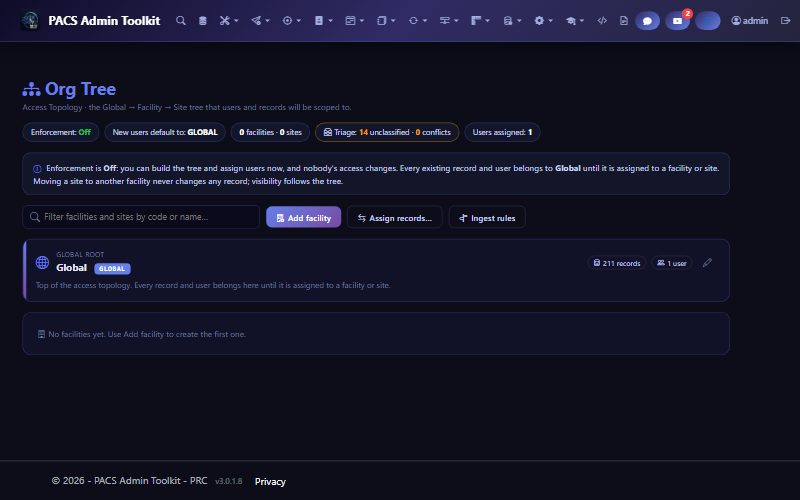
An org tree that mirrors your network
One Global root, then facilities (a hospital or organisation), then sites (a department, campus or imaging centre), each with a code and badge colour.
An owner for every record
Studies, HL7 messages, worklist orders, forms, logs, picklists, templates, destinations and listeners each belong to exactly one unit.
Ownership decided as data arrives
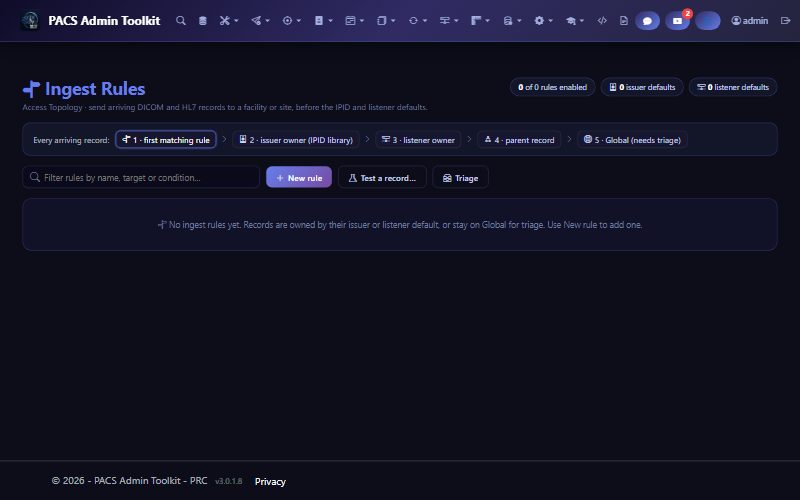
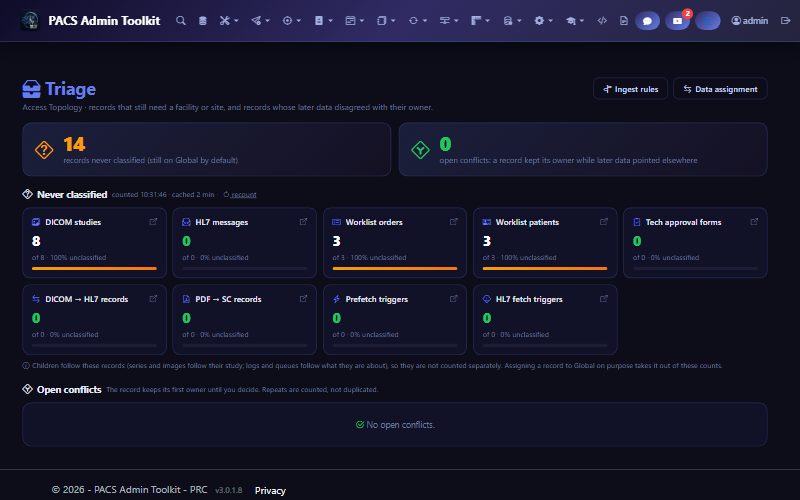
Ingest rules, issuer-of-patient-ID owners and listener owners classify each image, message or order once; nothing that can't be classified is rejected, it is kept and counted in Triage.
People get access per unit
Admin or User on one or more facilities or sites, by hand, copied from a colleague, or from AD groups at every sign-in, with optional expiry for locums and vendors.
Safe roll-out
Each area (worklist, HL7, SR, local database, messenger and more) goes Off, then Shadow, which records what would be hidden or refused, then Enforce. One switch turns it all off again with nothing lost.
Existing data classified safely
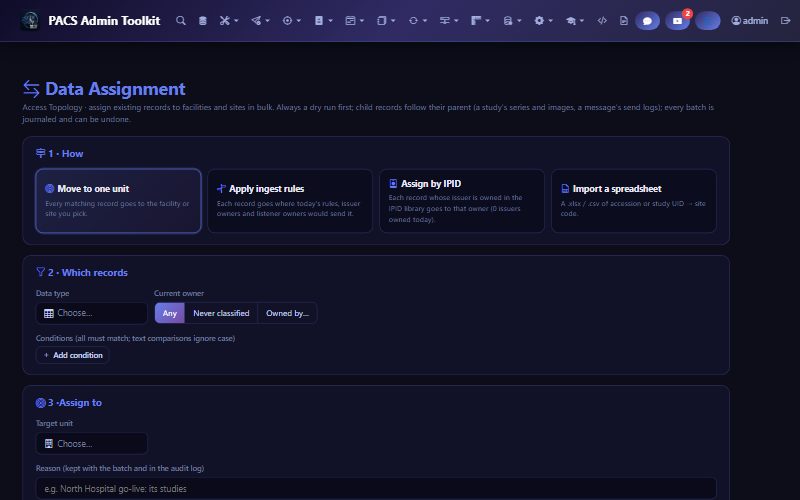
Data Assignment applies today's rules, issuers or a spreadsheet to stored records, with a preview, background batches and undo from history.
Sharing without copies
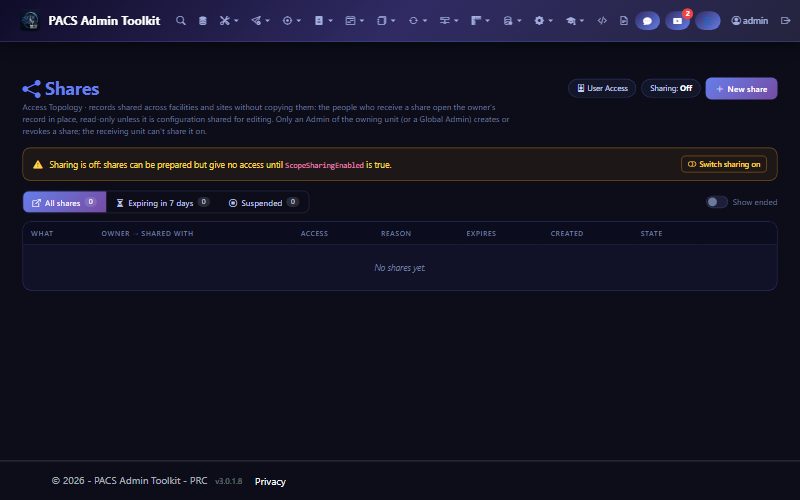
A share lets another site open one study, a patient's studies or a configuration category in place, with a required reason, optional expiry and audited reads.
Network scoping for devices
Serve only narrows a listener's queries or a modality's worklist to one unit; Accept only keeps a destination to its own unit's data. Both fail closed.
Check before you tell anyone
Effective access and View as show the app exactly as a given person sees it; a hidden record answers "not found", never revealing that it exists.
How it works
- Build the tree. Add facilities and sites; nothing changes for users yet.
- Assign people. Give each person Admin or User on their units, or map AD groups.
- Classify data. Ingest rules, issuer and listener owners for new data; Data Assignment for history.
- Shadow. Let people work for a week while every would-be refusal is recorded and explained.
- Enforce. Switch one area at a time; people below Global see only their units' records.
Use cases
Hospital network adding a second facility
Challenge. A newly joined hospital will send studies and orders to the same PATK installation, and neither hospital's staff may see the other's patients.
With PATK. A new facility in the org tree, its issuer and new listener given that owner, staff assigned to it, a week in Shadow, then Enforce area by area.
Outcome. One installation and one set of upgrades for both hospitals, with privacy proven in the Shadow report before it was switched on.
Radiologists and locums reading for several sites
Challenge. A teleradiology group's readers cover two sites in different facilities; locums need access for a few weeks only.
With PATK. Each reader gets User on exactly those two sites, with an expiry date for locums; a scope switcher lets them narrow to one site while reading.
Outcome. Readers see the sites they cover and nothing else, and temporary access ends on its own without a ticket.
A transfer patient's prior imaging
Challenge. A patient moves from one hospital to another; the receiving ED needs the earlier CT for two weeks, and nothing more.
With PATK. The sending site's admin shares that one study with the receiving site, with a reason and a 14-day expiry.
Outcome. The receiving team opens the study in place, read-only and badged as shared; every read is audited and access stops at expiry.
Trust · Truth · Transform
Trust
Every record has one owner, access is granted per unit, shares need a reason, and every grant, share and read through a share is in the audit log. Device scoping fails closed.
Truth
The Shadow report shows exactly who would lose what before anything is enforced; Triage shows records nobody classified; Effective access shows what one person really sees.
Transform
One installation serves the whole network: one upgrade, one configuration with site-level copies where needed, and access changes made by facility admins instead of central IT.
Value model
An example three-facility network running one PATK installation instead of one per facility.
| Assumption | Example value |
|---|---|
| Facilities served by one installation | 3 |
| Separate installations avoided | 2 |
| Admin hours per year to run each extra installation (upgrades, duplicated configuration) | 80 (160 in all) |
| Access reviews and privacy questions per year, hours saved on each with Effective access and the audit log | 24 x 3 hours (72) |
| Blended IT and PACS administrator cost per hour | $60 |
| Server and hosting cost avoided per extra installation per year | $6,000 |
| Estimated yearly value | $26,000 |
Illustrative only: every assumption is shown so you can replace it with your own numbers. Your results will differ.
Why it stands out
- Proven before it is enforced. Shadow mode records every read that would be hidden and every change that would be refused, area by area; most access projects have only "switch it on and see".
- Never in the way of clinical data. Unclassified data is stored and counted, never rejected; listeners keep receiving whatever the enforcement mode.
- Reversible. One switch returns every area to Off at once; owners, assignments, rules and shares stay ready for the next attempt.
- Covers the whole platform. The same owner and assignment model applies to routing, worklist, reporting, priors, messenger and insights, rather than a separate permission scheme per tool.
At a glance
| Structure | Global, facilities, sites; Admin or User assignments with optional expiry |
|---|---|
| Ownership | Ingest rules (DICOM tags, AE / IP, HL7 fields, schedule), issuer of patient ID, listener owner, inheritance |
| Roll-out | Off / Shadow / Enforce per area, Shadow report with explanations, one-switch rollback |
| Tools | Data Assignment (preview, batches, undo), Triage, Effective access, View as, scope switcher |
| Sharing and devices | Record, patient and category shares; Serve only and Accept only per listener, device or destination |
| Identity | Manual, copy access, AD group mappings re-synced at sign-in, API key scopes |
Screenshots
More in Insight & Governance
Insights
Volumes, sizes, speeds and success rates for everything PATK handles, by day, week, month or year.
Queries
Ask your own data the question, chart the answer, and share it, without waiting on a report request.
Not a medical device. PACS Admin Toolkit is not FDA-cleared or CE-marked and is not intended for primary diagnosis. It manages imaging and reporting data and workflows around the clinical systems that do.
Other product and company names may be trademarks of their respective owners. Screenshots show sample data. Value models are illustrative estimates, not guarantees.